A lightweight and flexible library that extends MediatR to provide seamless caching and cache invalidation for requests using pipeline behaviors in .NET applications.
This library integrates caching as a cross-cutting concern, enabling developers to cache query results 🚀 and invalidate caches efficiently within the MediatR pipeline, improving application performance and scalability.



- Seamless Integration: Adds caching to MediatR requests using pipeline behaviors.
- Flexible Cache Storage: Supports both in-memory (
IMemoryCache) 💾 and distributed caching (IDistributedCache) 🌐. - Automatic Cache Invalidation: Invalidate cached requests based on other requests or EntityFramework ChangeTracker.
- Customizable Cache Options: Configure expiration ⏳, sliding expiration, and cache keys per request.
- ASP.NET Core Compatibility: Works with ASP.NET Core’s DI and caching infrastructure.
- Extensible Design: Easily extend or customize caching behavior to suit your needs.
- Server Sync: This library use sync data with server for using in microservice applications.
You can install NexGen.MediatR.Extensions.Caching via NuGet Package Manager or the .NET CLI.
Install-Package NexGen.MediatR.Extensions.Cachingdotnet add package NexGen.MediatR.Extensions.CachingIn your Startup.cs or Program.cs, register MediatR and caching:
-
Using
MemoryCachebuilder.Services.AddMediatROutputCache(opt => { opt.UseMemoryCache(); });
-
Using
Redis(NexGen.MediatR.Extensions.Caching.Redis)Installation:
dotnet add package NexGen.MediatR.Extensions.Caching.Redis
Configuration:
builder.Services.AddMediatROutputCache(opt =>
{
    var redisConnectionString = "localhost:6379,password=YourRedisPassword";
    opt.UseRedisCache(redisConnectionString);
});
-
Using
Garnet(NexGen.MediatR.Extensions.Caching.Garnet)Installation:
dotnet add package NexGen.MediatR.Extensions.Caching.Garnet
Configuration:
builder.Services.AddMediatROutputCache(opt =>
{
    var garnetConnectionString = "localhost:6379,password=YourGarnetPassword";
    opt.UseGarnetCache(garnetConnectionString);
});
-
Using
EntityFramework Auto Evict(NexGen.MediatR.Extensions.Caching.EntityFramework)Installation:
dotnet add package NexGen.MediatR.Extensions.Caching.EntityFramework
Configuration:
builder.Services.AddDbContext<AppDbContext>((sp, optionsBuilder) =>
{
  // Other dbcontext settings
  ...

  // Use this method to set auto evict based on EF change tracker
  optionsBuilder.UseMediatROutputCacheAutoEvict(sp);
});
Add RequestOutputCache attribute to your IRequest class:
Note
The request class must implement IRequest<TResponse> where TResponse is class, record or interface (the mediator request format)!
Important
If you want to use EntityFramework ChangeTracker auto evict to invalidate the cache based on database dbset changes,
Provide nameof all db entities that are related to the response. e.g. tags: [nameof(UserDbEntity), nameof(OrderDbEntity)]
[RequestOutputCache(tags: ["weather", nameof(WeatherForecastDbEntity)], expirationInSeconds: 3600)]
public class WeatherForecastRequest : IRequest<IEnumerable<WeatherForecastDto>>
{
    public int Limit { get; set; } = 10;
    public int Offset { get; set; } = 0;
}Invalidate cached responses by tags:
public class TestClass
{
    private readonly IRequestOutputCache<WeatherForecastEvictRequest, string> _cache;

    public TestClass(IRequestOutputCache<WeatherForecastEvictRequest, string> cache)
    {
        _cache = cache;
    }

    public async Task EvictWeatherResponses()
    {
        List<string> tags = [ "weather" ];
        await _cache.EvictByTagsAsync(tags);
    }
}
Note
If you configure EntityFramework to detect change of cached items, you dont need to evict records by yourself.
Suppose you have a query to fetch a list of Weather Forecasts:
[RequestOutputCache(tags: ["weather"], expirationInSeconds: 300)]
public class WeatherForecastRequest : IRequest<IEnumerable<WeatherForecastDto>>
{
    public int Limit { get; set; } = 10;
    public int Offset { get; set; } = 0;
}

public class WeatherForecastRequestHandler : IRequestHandler<WeatherForecastRequest, IEnumerable<WeatherForecastDto>>
{
    private static readonly string[] Summaries = new[]
    {
        "Freezing", "Bracing", "Chilly", "Cool", "Mild", "Warm", "Balmy", "Hot", "Sweltering", "Scorching"
    };

    public async Task<IEnumerable<WeatherForecastDto>> Handle(WeatherForecastRequest request, CancellationToken cancellationToken)
    {
        await Task.Delay(2000, cancellationToken);
        return Enumerable.Range(1, request.Limit).Select(index => new WeatherForecastDto
        {
            Date = DateOnly.FromDateTime(DateTime.Now.AddDays(index)),
            TemperatureC = Random.Shared.Next(-20, 55),
            Summary = Summaries[Random.Shared.Next(Summaries.Length)]
        }).ToArray();
    }
}
The response will be cached with the key "weather" for 5 minutes.
Important
If expirationInSeconds is not provided, it uses the default value. To make the response never expire, set expirationInSeconds to Zero.
When a response must be updated, invalidate the product list cache:
public class WeatherForecastUpdateRequest : IRequest<string>
{
}

public class WeatherForecastUpdateRequestHandler : IRequestHandler<WeatherForecastUpdateRequest, string>
{
    private readonly IRequestOutputCache<WeatherForecastUpdateRequest, string> _cache;

    public WeatherForecastUpdateRequestHandler(IRequestOutputCache<WeatherForecastUpdateRequest, string> cache)
    {
        _cache = cache;
    }

    public async Task<string> Handle(WeatherForecastUpdateRequest request, CancellationToken cancellationToken)
    {
        var tags = new List<string> { nameof(WeatherForecastDto) };
        await _cache.EvictByTagsAsync(tags, cancellationToken);

        return "Evicted!";
    }
}
Note
See IntegrationTests in net8.0/test folder for more working examples.
Note
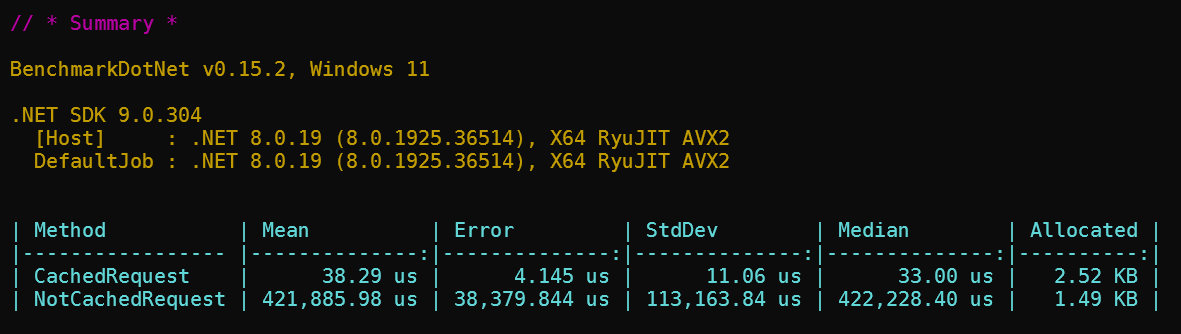
This benchmark is available in benchmark directory (NexGen.MediatR.Extensions.Caching.Benchmark).
Tip
This is benchmark results of testing same simple request with and without caching using NexGen.MediatR.Extensions.Caching package.
The bigger and complicated responses may use more allocated memory in memory cache solution.
Better to use distributed cache services like Redis in enterprise projects.
Contributions are welcome! To contribute to NexGen.MediatR.Extensions.Caching:
- Fork the repository.
- Create a new branch (
git checkout -b feature/your-feature). - Make your changes and commit them (
git commit -m "Add your feature"). - Push to the branch (
git push origin feature/your-feature). - Open a pull request.
Please ensure your code follows the project's coding standards and includes unit tests where applicable.
This project is licensed under the MIT License. See the LICENSE file for details.