
The VSCode for Cloud Storage. Explorer, Analyze and Machine Learning all in one App. GCS, Azure Blob, S3 and local folders in one window — and every byte stays on your machine.
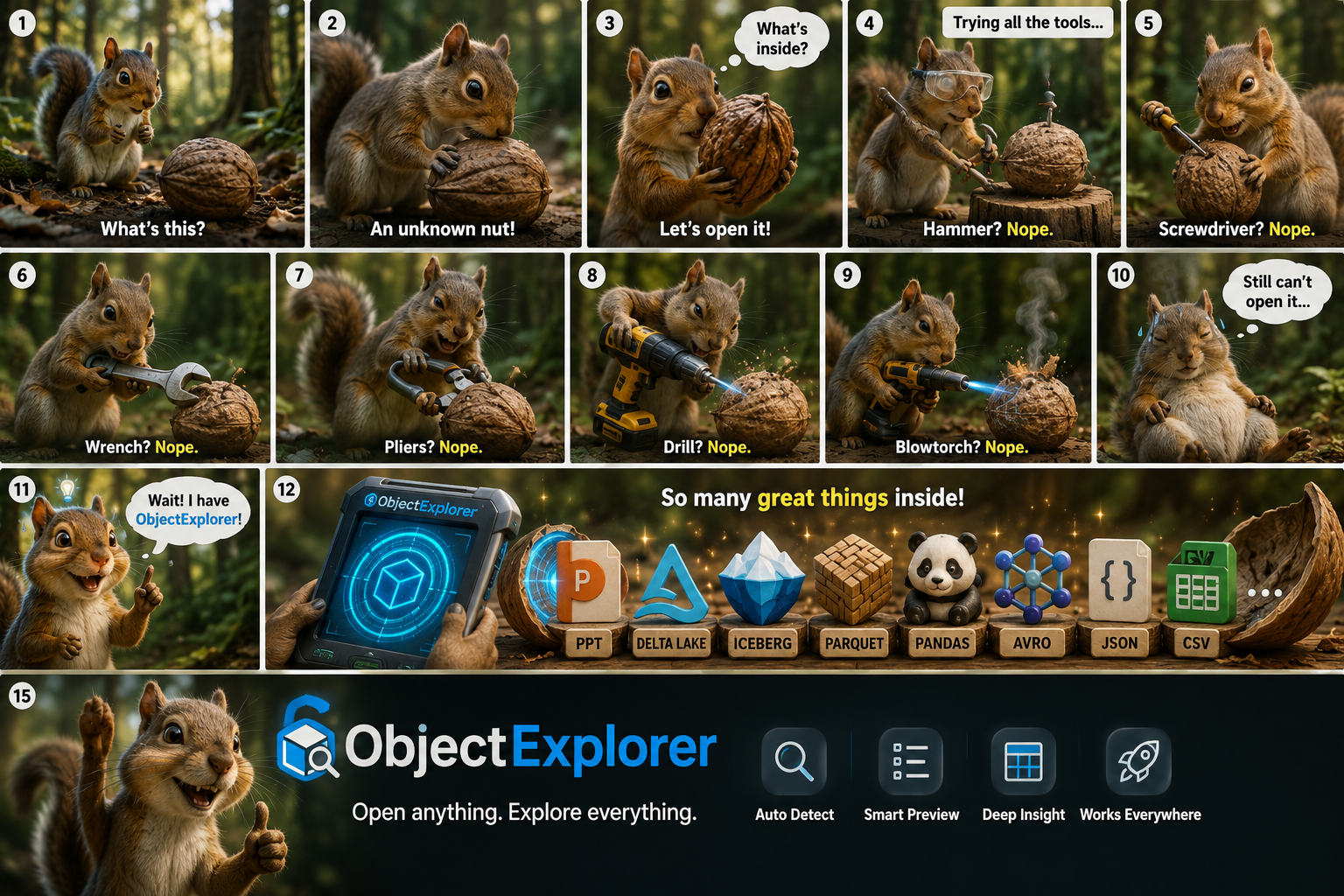
🎬 Watch the 40-second tour — it plays on the home page, with sound.
📖 Documentation · 🚀 Try it in a browser
A cloud console can list your objects and little else. To find out what is actually inside a
Parquet file you download it, open a notebook, read it, and delete the copy — for one look at one
file. Do that across three providers and you are also juggling three consoles, three sets of
credentials, and a Downloads folder full of data that should never have left the bucket.
ObjectExplorer collapses that loop:
- One window for every provider. S3, GCS, Azure Blob, MinIO and your local disks in the same tree, with the same keyboard shortcuts.
- Preview instead of download. Formats render in place — including the ones no console will ever open, like Parquet, SPSS and SAS.
- Search across buckets. One query over local folders and cloud prefixes at the same time.
- Query, chart and model in place. A table opens as a notebook: SQL over the object, a chart of what came back, and a gradient boosting model over the rows — all on your machine.
- Delta, Iceberg and Hudi are just tables. Point DuckDB at the folder and it answers, deletes and schema changes included.
- Move things where they belong. Copy, move, rename and delete across buckets and disks, with one Undo — the explorer half of a file explorer, not only the reading half.
ObjectExplorer is an HTTP server bound to 127.0.0.1 plus the OS webview, both inside the same
executable. Every parser — Parquet, SPSS, SAS, PDF, the office formats, the image decoders — runs
in a worker on your own machine.
Objects are fetched from your cloud provider to your computer and nowhere else; we run no backend that sees your data, because there is nothing for it to see. Credentials stay local. The only call that is not to your own storage is a version check against the npm registry.
Which also means there is no data-processing agreement to negotiate before anyone can look at a bucket. → the whole argument
Access it instantly at objectexplorer.com/app, or download the latest version for your machine.
| Platform | Download |
|---|---|
| macOS, Apple Silicon | ObjectExplorer-mac-arm64.dmg |
| macOS, Intel | ObjectExplorer-mac-x64.dmg |
| Windows, x64 | ObjectExplorer-windows-x64.msix |
| Windows, ARM | ObjectExplorer-windows-arm64.msix |
| Linux, x64 | ObjectExplorer-linux-x64.AppImage |
| Linux, ARM | ObjectExplorer-linux-arm64.AppImage |
Or run it with no install at all, if you have Node 20+:
npx @knockdata/objectexplorerPer-platform notes — notarization, SmartScreen, the WebKitGTK package Linux needs — are in getting started, and the answers to the usual snags are in troubleshooting.
| Provider | Connect with |
|---|---|
 Amazon S3 Amazon S3 |
an accessKeys.csv, a key ID and secret, or the AWS CLI you already signed in to |
 Google Cloud Storage Google Cloud Storage |
your Google account |
 Azure Blob Storage Azure Blob Storage |
a connection string, a SAS URL, or your Microsoft account |
 MinIO MinIO |
your own endpoint, for self-hosted S3-compatible storage |
 Local folders Local folders |
the native folder picker — any disk, any mounted volume |
Buckets appear once you add them, so a thousand-bucket account still opens on the five you use. → connecting storage
| Parquet |  parquet — schema, rows and column summaries |
| Data lake |  delta iceberg hudi, Hive and date partitions — a folder read as one table |
| Tabular | csv tsv json jsonl yaml  avro  orc  arrow |
| Statistics |  xpt sas7bdat (SAS)  sav (SPSS) |
| Office |  pptx  xlsx  docx — rendered without Office |
| Documents |  pdf page by page,  evernote notes |
| Ebooks |  epub mobi azw3 fb2 cbz — read as a book |
| Images |  png jpg webp svg — with EXIF, GPS and embedded text |
| Audio and video |  mp3 wav m4a  mp4 — played in place |
| Archives |  zip dmg apkg, browsed as folders |
| Notebooks |  ipynb with its outputs |
| Logs |  Cloud Logging and OpenTelemetry, live or exported Cloud Logging and OpenTelemetry, live or exported |
| Everything else |  hex, always available hex, always available |
The whole list is on every format.
 Connect storage Connect storage |
S3, GCS, Azure Blob, MinIO, local folders — added one root at a time |
 Preview anything Preview anything |
every format above, rendered in place by a parser on your machine |
 Column summaries Column summaries |
a histogram, a box plot or a split bar under every column header |
 Notebook Notebook |
SQL, charts, models and JavaScript over the object you clicked |
 Data lake tables Data lake tables |
Delta, Iceberg, Hudi and partitioned exports, read as one table |
 Models Models |
LightGBM in WebAssembly, with exact TreeSHAP explanations |
 Search Search |
local folders and cloud prefixes in the same run |
 File management File management |
copy, move, rename, delete across providers, with a trash and an undo |
 Sharing Sharing |
a link to a table, masked or hashed column by column, with an expiry |
 Cloud Logging Cloud Logging |
a live tail with a timeline, a source tree and a trace waterfall |
- objectexplorer.com — the product page and the documentation
- objectexplorer.com/app — the app itself, in a browser
- @knockdata/objectexplorer — the npm package behind
npx - Changelog — what changed in each version
- Releases — every version, every platform
Under the hood it is a single native binary: no Electron, no Chromium, just the OS webview (WebKit on macOS and Linux, WebView2 on Windows) pointed at the HTTP server running inside the same executable.