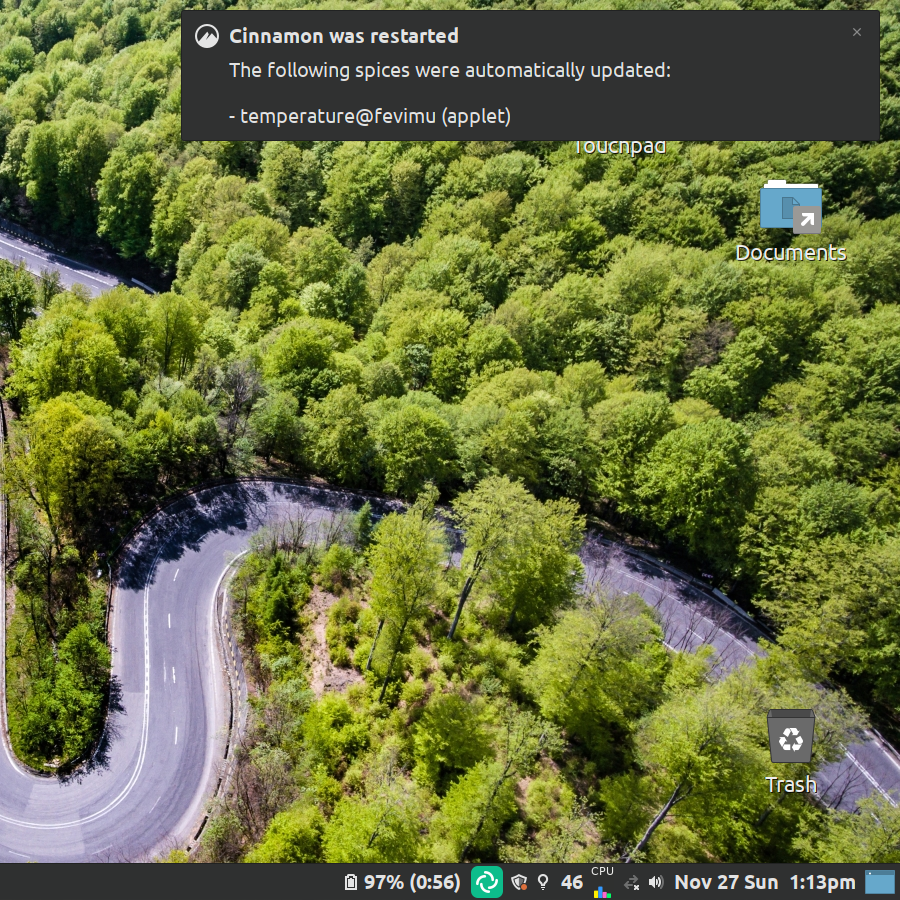
Notification stating Cinnamon spices have been automatically updated does not disappear automatically, particularly when mintUpdate is configured to automatically update everything #11307

Description

 * Cinnamon 5.4.12
 * Mint 21.0
 * [desktop PC] Radeon HD5450 + mesa 22.0.5-0ubuntu0
 * [notebook PC] Intel HD Graphics 3000 (i5-2520M integrated) + mesa 22.0.5-0ubuntu0
 * 64bit
Issue
Simply put, the notification that appears when Cinnamon spices have been automatically updated does not disappear automatically and requires manually clicking on the notification for it to go away, particularly when mintUpdate is configured to automatically update everything.
Steps to reproduce
-
Make sure mintUpdate is configured accordingly so that it automatically updates everything in the background, including automatically updating Cinnamon spices
-
wait for an unknown period of time until an update is available to Cinnamon spices
-
allow the updates for your Cinnamon spices to download
-
restart your PC (you may only need to log out instead, in which case this could theoretically even be tested on a live ISO session)
-
observe that your Cinnamon spices have been updated, yet the on-screen notification stating that it has been installed will remain on-screen until you click on it
Expected behaviour
The notification stating that one (or more) of your Cinnamon spices have been automatically been updated should automatically go away after the same period of time that other notifications do, e.g. the (network) "connection established" notification.
Configuration info, if applicable
As stated above, mintUpdate should be configured to have everything automatically update, including Cinnamon spices.
Possibly related to #11309