Refers to the meaning or additional information granted by the elements or labels of the language, information that defines or describes the content, function or section it contains.
- Search engine optimization (html code analysis)
- Accessibility
- Practicality
- Reusability
- Provides additional information about that document, which aids in communication.
- Semantic tags make it clear to the browser what the meaning of a page and its content is.
- That clarity is also communicated with search engines, ensuring that the right pages are delivered for the right queries.
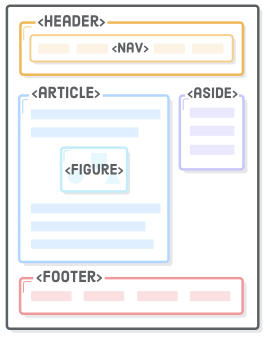
Document structure: HTML5 has added a slew of new tags that can be used to add rich semantic meaning to the structure of an HTML document
<body>
    <header>
        <!-- Typically contains the site logo, heading elements, and site navigation -->
    </header>
    <nav>
        <!-- Contain blocks of site navigation links -->
    </nav>
    <article>
        <!-- Identify a block of content suitable for reuse (eg: blog, article) -->
    </article>
    <aside>
        <!--  Content that is related to the main content. But isn't part of the primary flow of the page -->
    </aside>
    <main>
        <!-- Content that is unique to a single web page -->
    </main>
    <section>
        <!-- Mark off sections of a document (eg: chapters, major sections) -->
    </section>
    <footer>
        <!-- Typically contains authorship, contact, and copyright information -->
    </footer>
</body>
Textual meaning: Arrange, fonts and style text.
<body>
    <header>
        <h1>PUSH DEV</h1>
        <h2>Welcome to the <strong>HTML</strong> tutorial by Push Dev</h2>
    </header>
    <h3>HTML: <mark>The basics</mark></h3>
    <main>
        <blockquote>
            "Everybody in this country should learn how to program a computer...
            because it teaches you how to think."
            - from
            <cite>
                The Lost Interview
            </cite>
            by Steve Jobs
        </blockquote>
    </main>
    <footer>
        <p>This example was created <time datetime="2020-04-12 11:21">at 11:21 AM</time></p>
    </footer>
</body>
Media type: The browser the need to queue up a specific technical resource... and they are semantic tags.
    <audio controls>
            <!--
                type: MP3-audio/mpeg, OGG-audio/ogg, WAV-audio/wav
            -->
            <source src="thunderstruck.mp3" type="audio/mpeg">
            Your browser does not support the audio element.
        </audio>

        <video width="400" controls>
            <!-- The controls attribute adds video controls, like play, pause, and volume.-->
            <!-- <source> element allows you to specify alternative video files which the browser may choose from. The browser will use the first recognized format.-->
            <source src="./pokemon.mp4" type="video/mp4" />
        </video>

        <!-- Youtube video -->
        <iframe width="443" height="332" src="https://www.youtube.com/embed/wZZ7oFKsKzY" frameborder="0" allow="accelerometer; autoplay; encrypted-media; gyroscope; picture-in-picture" allowfullscreen></iframe>

        <!-- Figure-img -->
        <figure>
            <img src="push_logo.PNG" alt="PushDev">
            <br>
            <figcaption>
                Learning with PushDev
            </figcaption>
          </figure>
Read more: https://html.com/document/#ixzz6JbS4IkTf Let's see more examples: Semantic structure
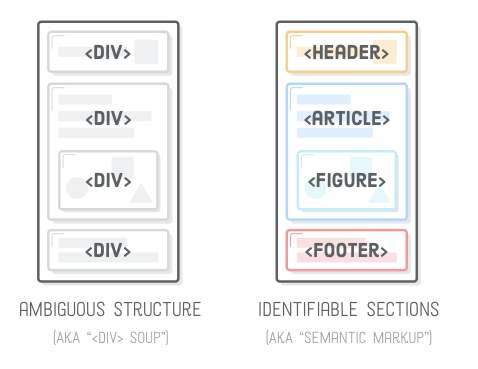
   <!-- Don't -->
   <div id="header"/>
   <div id="nav"/>
   <div id="footer"/>

    <!-- Do -->
   <header>
    <!-- header content -->
      <nav>
      <!-- nav content -->
      </nav>
   </header>

  <footer>
     <!-- footer content -->
    <p> PushDev 2020 </p>
</footer>- Inside your fork html-tutorial repo, under the 3-semantic-html folder, create a file named basic.html Don't forget to include the .html extension
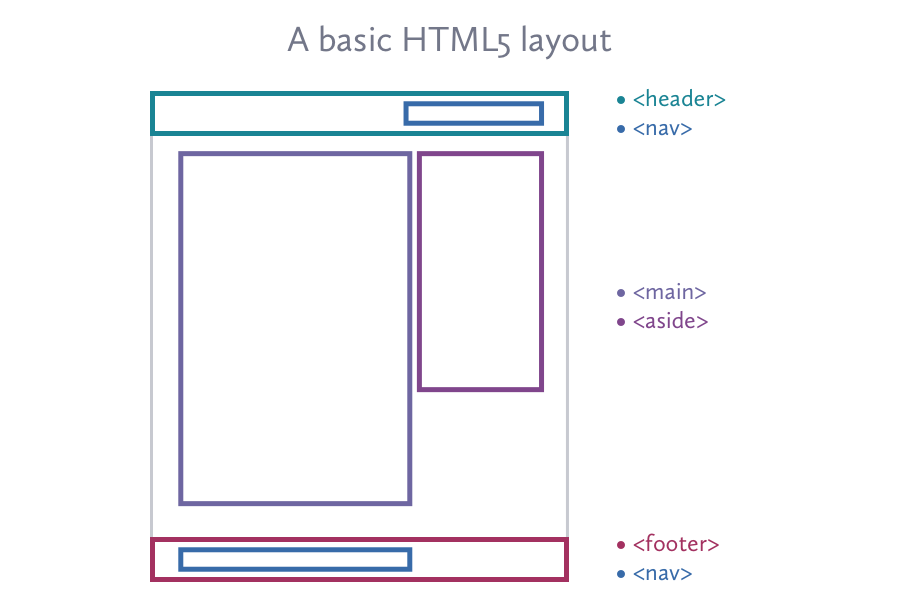
- Build in HTML a simple layout with semantic structure. The layout must have the following elements:
- Inside the
<main>tag include an article that follows this structure:
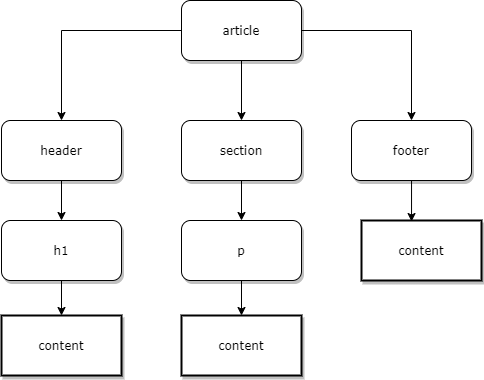
- Push the changes to your local copy of the repo. Remember to invite pushdev-code to your repo as collaborator