Skip to content

fix: 修复评论区表情面板被裁剪及分类切换抖动 - #636

Merged
CuteLeaf merged 2 commits into
CuteLeaf:masterfrom
ImYufish:master
Sep 12, 2026
Merged

CuteLeaf merged 2 commits into
CuteLeaf:masterfrom
ImYufish:master

Conversation

@ImYufish

@ImYufish ImYufish commented Sep 11, 2026

Copy link
Copy Markdown
Contributor

PR:修复评论区表情面板被裁剪及分类切换抖动

涉及 3 个文件:

  • src/components/comment/index.astro
  • src/components/comment/Waline.astro
  • src/utils/sidebar-effective-utils.ts

Type of change

  • Bug fix (a non-breaking change that fixes an issue)
  • New feature (a non-breaking change that adds functionality)
  • Breaking change (fix or feature that would cause existing functionality to not work as expected)
  • Other (please describe):

Checklist

  • I have read the CONTRIBUTING document.
  • I have checked to ensure that this Pull Request is not for personal changes.
  • I have performed a self-review of my own code.
  • My changes generate no new warnings.

Related Issue

本修复暂无直接关联 issue

Changes

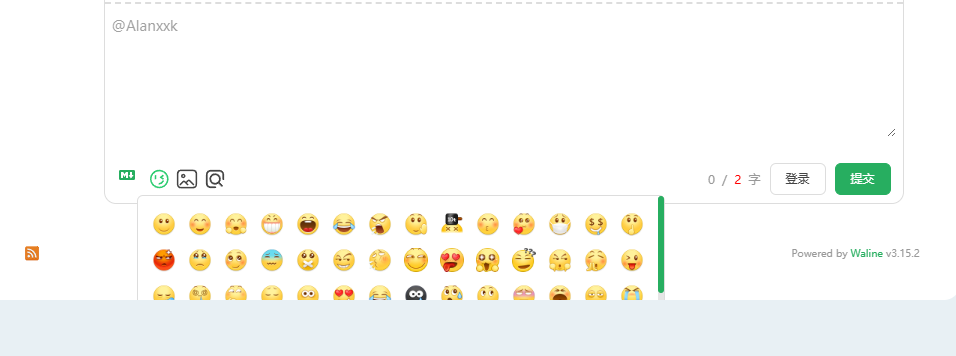
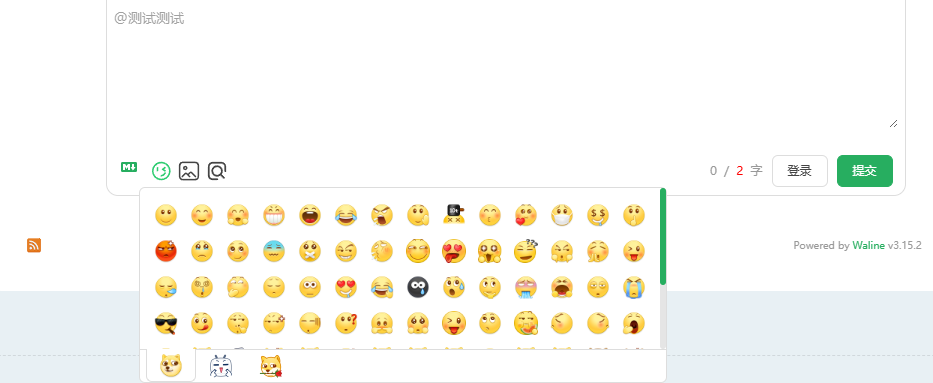
修复 Waline 回复编辑器内表情面板被主题自身 overflow:hidden 纵向裁切、以及切换分类时表情网格与分类 tab 发生位移的问题。

涉及 3 个文件:

1. src/components/comment/index.astro

评论卡片 #post-commentsoverflow-hidden 改为 overflow-x-clip overflow-y-visible:只裁横向溢出、纵向放开,表情面板浮层不再被裁。原本靠 overflow-hidden 实现的右上角装饰圆裁切,移入独立的绝对定位裁剪层(.absolute.inset-0.overflow-hidden.rounded-(--radius-large).pointer-events-none),圆角裁剪效果保留、且不影响评论区浮层。

2. src/utils/sidebar-effective-utils.ts

内容列 staticBarClassmin-w-0 overflow-hidden 改为 min-w-0 overflow-x-clip overflow-y-visibleoverflow-x: clip 不生成滚动容器、不影响列内元素吸顶,纵向放开后浮层可完整显示。

说明:新架构下页脚已移除 onload-animation、不再自成堆叠上下文,故无需像旧架构那样给内容列加 relative z-20

3. src/components/comment/Waline.astro

针对 Waline 表情面板新增全局样式,逐项消除切换分类时的位移:

  • .wl-tab-wrapperscrollbar-gutter: stable —— 预留滚动条槽位,避免内容溢出时的滚动条挤掉约 6px 宽度导致网格重排;
  • .wl-tab-wrapper 固定 height: 145px(取自 Waline 自身 max-height)—— 内容不足的分类网格区不再按内容收缩、避免比顶满时矮 1px;
  • .wl-tabs .wl-tab:not(.active)border: solid transparent; border-width: 0 1px 1px —— Waline 给选中态加了 0 1px 1px 边框使激活 tab 比未激活宽 2px 高 1px,未选中态补等宽透明边框统一占位,切换时相邻 tab 不再左右挪动。

How To Test

  1. 打开任意启用 Waline 的文章页(需配置 commentConfig.type: "waline"serverURL)。
  2. 点击某条评论的「回复」,进入回评编辑态。
  3. 点击工具栏的表情按钮打开面板 → 面板下半截与底部分类 tab 应完整可见、不被裁切。
  4. 依次点击不同分类 tab → 表情网格与分类 tab 位置恒定、无位移;点击表情可正常插入(如 :bb_doge:)。
  5. 验证类型与格式:npx astro sync && npx tsc --noEmit -p tsconfig.json 无错误,npx biome check 无修复项。

Screenshots (if applicable)

修复前
修复前
修复后
修复后

Additional Notes

Sourcery 总结

修复 Waline 表情选择器的可见性问题,并防止切换表情分类时发生布局偏移。

Bug 修复:

  • 防止 Waline 的表情选择器因评论卡片和内容列的溢出设置而在垂直方向被裁剪。
  • 消除切换 Waline 表情分类时的布局偏移。

增强功能:

  • 独立保留评论卡片的装饰性裁剪,同时允许垂直溢出的评论覆盖层保持可见。
  • 通过预留滚动条空间、保持一致的网格高度以及统一标签页尺寸,稳定不同分类下的表情选择器布局。
Original summary in English

Summary by Sourcery

Fix Waline emoji picker visibility and prevent layout shifts when switching emoji categories.

Bug Fixes:

  • Prevent Waline’s emoji picker from being vertically clipped by the comment card and content column overflow settings.
  • Eliminate layout shifts when switching Waline emoji categories.

Enhancements:

  • Preserve comment-card decorative clipping independently while allowing vertically overflowing comment overlays to remain visible.
  • Stabilize the emoji picker layout across categories by reserving scrollbar space, maintaining a consistent grid height, and equalizing tab dimensions.
Original summary in English

评论区(Waline)在回复编辑器里打开表情面板时,面板下半截连同底部分类 tab 会被主题自身的 overflow:hidden 裁掉;切换表情分类时表情网格与分类 tab 还会发生位移。

卡片与内容列改为「只裁横向、纵向放开」,网格高度与滚动条槽位改为恒定,并统一分类 tab 的占位尺寸。
@vercel

vercel Bot commented Sep 11, 2026

Copy link
Copy Markdown

@ImYufish is attempting to deploy a commit to the xiaye's projects Team on Vercel.

A member of the Team first needs to authorize it.

@netlify

netlify Bot commented Sep 11, 2026

Copy link
Copy Markdown

Deploy Preview for demo-firefly ready!

Name Link
🔨 Latest commit 4c7515e
🔍 Latest deploy log https://app.netlify.com/projects/demo-firefly/deploys/6aa4edb775582e0008936cd8
😎 Deploy Preview https://deploy-preview-636--demo-firefly.netlify.app
📱 Preview on mobile
Toggle QR Code...

QR Code

Use your smartphone camera to open QR code link.

To edit notification comments on pull requests, go to your Netlify project configuration.

@sourcery-ai

sourcery-ai Bot commented Sep 11, 2026

Copy link
Copy Markdown

审查者指南

通过分离装饰层与评论内容的裁剪责任、放开评论区及内容列的纵向溢出,并为 Waline 表情面板统一滚动条、网格高度和 tab 边框占位,修复表情面板被裁剪及分类切换时的布局抖动。

文件级变更

变更 详情 文件
放开评论卡片的纵向溢出,同时将装饰背景移入独立裁剪层。
  • 将评论卡片改为仅裁剪横向溢出、允许纵向溢出。
  • 通过独立的绝对定位层保留装饰圆角裁剪效果。
src/components/comment/index.astro
调整内容列的溢出策略,确保浮层完整显示且不破坏吸顶布局。
  • 将内容列从统一隐藏溢出改为横向 clip、纵向 visible。
  • 利用 overflow-x: clip 避免生成滚动容器。
src/utils/sidebar-effective-utils.ts
为 Waline 表情面板补充稳定布局样式,消除分类切换时的尺寸和位置抖动。
  • 预留滚动条槽位并固定表情网格区域高度。
  • 为未激活分类补充透明边框,使各 tab 尺寸一致。
src/components/comment/Waline.astro

提示和命令

使用 Sourcery

  • 触发新的审查: 在拉取请求中评论 @sourcery-ai review
  • 继续讨论: 直接回复 Sourcery 的审查评论。
  • 从审查评论生成 GitHub issue: 回复审查评论,请 Sourcery 根据该评论创建 issue。你也可以回复审查评论并使用 @sourcery-ai issue,以从中创建 issue。
  • 生成拉取请求标题: 在拉取请求标题的任意位置写入 @sourcery-ai,即可随时生成标题。你也可以在拉取请求中评论 @sourcery-ai title,以随时生成或重新生成标题。
  • 生成拉取请求摘要: 在拉取请求正文的任意位置写入 @sourcery-ai summary,即可在指定位置随时生成 PR 摘要。你也可以在拉取请求中评论 @sourcery-ai summary,以随时生成或重新生成摘要。
  • 生成审查者指南: 在拉取请求中评论 @sourcery-ai guide,即可随时生成或重新生成审查者指南。
  • 解决所有 Sourcery 评论: 在拉取请求中评论 @sourcery-ai resolve,即可解决所有 Sourcery 评论。如果你已经处理完所有评论并且不想再看到它们,此命令会很有用。
  • 忽略所有 Sourcery 审查: 在拉取请求中评论 @sourcery-ai dismiss,即可忽略所有现有的 Sourcery 审查。如果你想从新的审查开始,这一功能尤其有用——别忘了评论 @sourcery-ai review 以触发新的审查!

自定义你的使用体验

访问你的控制面板以:

  • 启用或禁用审查功能,例如 Sourcery 生成的拉取请求摘要、审查者指南等。
  • 更改审查语言。
  • 添加、删除或编辑自定义审查说明。
  • 调整其他审查设置。

获取帮助

Original review guide in English

Reviewer's Guide

通过分离装饰层与评论内容的裁剪责任、放开评论区及内容列的纵向溢出,并为 Waline 表情面板统一滚动条、网格高度和 tab 边框占位,修复表情面板被裁剪及分类切换时的布局抖动。

File-Level Changes

Change Details Files
放开评论卡片的纵向溢出,同时将装饰背景移入独立裁剪层。
  • 将评论卡片改为仅裁剪横向溢出、允许纵向溢出。
  • 通过独立的绝对定位层保留装饰圆角裁剪效果。
src/components/comment/index.astro
调整内容列的溢出策略,确保浮层完整显示且不破坏吸顶布局。
  • 将内容列从统一隐藏溢出改为横向 clip、纵向 visible。
  • 利用 overflow-x: clip 避免生成滚动容器。
src/utils/sidebar-effective-utils.ts
为 Waline 表情面板补充稳定布局样式,消除分类切换时的尺寸和位置抖动。
  • 预留滚动条槽位并固定表情网格区域高度。
  • 为未激活分类补充透明边框,使各 tab 尺寸一致。
src/components/comment/Waline.astro

Tips and commands

Interacting with Sourcery

  • Trigger a new review: Comment @sourcery-ai review on the pull request.
  • Continue discussions: Reply directly to Sourcery's review comments.
  • Generate a GitHub issue from a review comment: Ask Sourcery to create an
    issue from a review comment by replying to it. You can also reply to a
    review comment with @sourcery-ai issue to create an issue from it.
  • Generate a pull request title: Write @sourcery-ai anywhere in the pull
    request title to generate a title at any time. You can also comment
    @sourcery-ai title on the pull request to (re-)generate the title at any time.
  • Generate a pull request summary: Write @sourcery-ai summary anywhere in
    the pull request body to generate a PR summary at any time exactly where you
    want it. You can also comment @sourcery-ai summary on the pull request to
    (re-)generate the summary at any time.
  • Generate reviewer's guide: Comment @sourcery-ai guide on the pull
    request to (re-)generate the reviewer's guide at any time.
  • Resolve all Sourcery comments: Comment @sourcery-ai resolve on the
    pull request to resolve all Sourcery comments. Useful if you've already
    addressed all the comments and don't want to see them anymore.
  • Dismiss all Sourcery reviews: Comment @sourcery-ai dismiss on the pull
    request to dismiss all existing Sourcery reviews. Especially useful if you
    want to start fresh with a new review - don't forget to comment
    @sourcery-ai review to trigger a new review!

Customizing Your Experience

Access your dashboard to:

  • Enable or disable review features such as the Sourcery-generated pull request
    summary, the reviewer's guide, and others.
  • Change the review language.
  • Add, remove or edit custom review instructions.
  • Adjust other review settings.

Getting Help

@sourcery-ai sourcery-ai Bot left a comment

Copy link
Copy Markdown

Choose a reason for hiding this comment

The reason will be displayed to describe this comment to others. Learn more.

嘿——我已经审阅了你的更改,整体看起来很棒!

Sourcery 评估

已批准。


Sourcery 对开源项目免费——如果你喜欢我们的评审,请考虑分享它们 ✨
Original comment in English

Hey - I've reviewed your changes and they look great!

Sourcery assessment

Approved.


Sourcery is free for open source - if you like our reviews please consider sharing them ✨

@CuteLeaf
CuteLeaf merged commit ffd881d into CuteLeaf:master Sep 12, 2026
9 of 11 checks passed
@CuteLeaf

Copy link
Copy Markdown
Owner

感谢PR

Sign up for free to join this conversation on GitHub. Already have an account? Sign in to comment

Labels

None yet

Projects

None yet

Development

Successfully merging this pull request may close these issues.

2 participants