A WordPress plugin to authenticate users via a OpenID Provider. This plugin is based on nicko170's wp-openid and it is adapted to work seamlessly with UPM's SIU.

- Download the latest release from GitHub Releases
- In WordPress, go to Plugins > Add New > Upload Plugin and upload the zip file.
- Activate the plugin.
- A new OpenID menu item will appear in the WordPress admin Settings menu.
- Follow the instructions on the Settings page to configure the plugin.
-
If you don't already have a Keycloak instance, you can run it up in Docker
-
Sign in to your Keycloak instance with your administrator account.
-
From the Admin dashboard, go to Clients > Create.
-
Enter the following values:
- Client Type: OpenID Connect
- Client ID: wordpress
- Name: WordPress
-
Click Next, and enable Client Authentication. You can leave the other options as their defaults.
-
Click Save, and set your URLs:
- Root URL:
https://example.com/ - Valid Redirect URIs:
https://example.com/index.php?rest_route=/openid/callback - Admin URL:
https://example.com/wp-admin - The other URLs can be left as their defaults.
- Root URL:
-
Click Save, and copy the Client ID and Client Secret values from the Credentials tab.
The plugin requires the following configuration options:
- Metadata URL (e.g.
https://example.okta.com/.well-known/openid-configurationor for Keycloakhttps://example.com/auth/realms/example/.well-known/openid-configuration) - Redirect URI (e.g.
https://example.com/wp-login.php?openid=callback) - Client ID (e.g.
0oa1b2c3d4e5f6g7h8i9j) - Client Secret (e.g.
0oa1b2c3d4e5f6g7h8i9j0oa1b2c3d4e5f6g7h8i9j)
You can set these options via the Settings > Okta page in the WordPress admin, or in your wp-config.php file if you
don't want them to be editable by other users:
define('WP_OPENID_METADATA_URL', 'https://example.okta.com/.well-known/openid-configuration');
define('WP_OPENID_REDIRECT_URI', 'https://example.com/wp-login.php?openid=callback');
define('WP_OPENID_CLIENT_ID', '0oa1b2c3d4e5f6g7h8i9j');
define('WP_OPENID_CLIENT_SECRET', '0oa1b2c3d4e5f6g7h8i9j0oa1b2c3d4e5f6g7h8i9j');
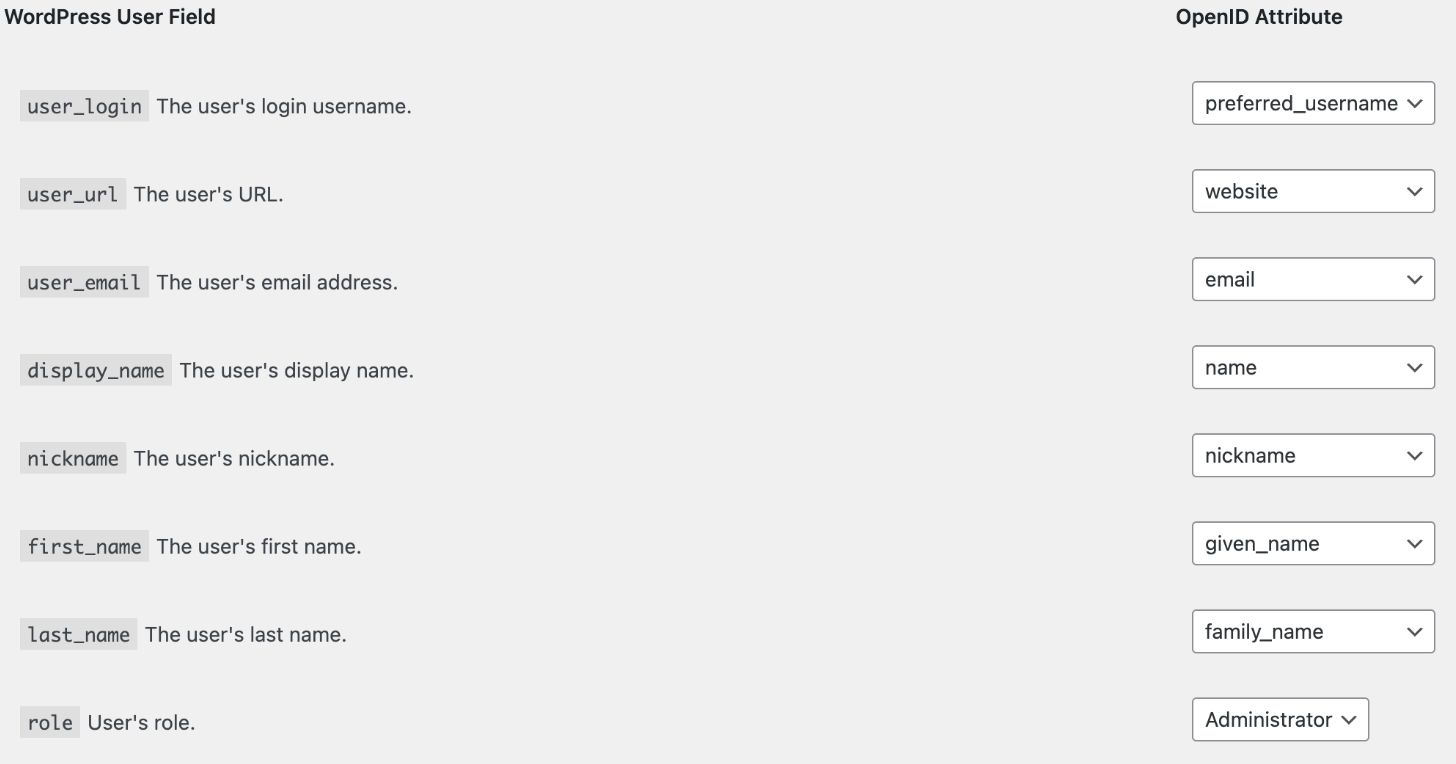
You can map user attributes from your OpenID Provider to WordPress user meta fields using the Settings > OpenID page.
The following WordPress user attributes are supported:
- user_login: The user's login username
- user_url: The user's website URL
- user_email: The user's email address
- display_name: The user's display name
- nickname: The user's nickname
- first_name: The user's first name
- last_name: The user's last name
The following OpenID Connect attributes are supported:
- sub: The user's unique identifier
- preferred_username: The user's preferred username
- name: The user's full name
- given_name: The user's first name
- family_name: The user's last name
- middle_name: The user's middle name
- nickname: The user's nickname
- profile: The user's profile page
- picture: The user's profile picture
- website: The user's website
- email: The user's email address
This plugin will also add the upmClassifCode values to user metadata.
- The
subclaim from the ID Token to theopenid_idmeta field on the user - The
emailclaim from the ID Token to theuser_emailfield on the user - The
preferred_usernameclaim from the ID Token to theuser_loginfield on the user
If you have remapped the email or preferred_username claims, your mapping will be used for user matching, before
falling back to email and preferred_username respectively.
If a user is not found, a new user will be created with the attributes as mapped in the Settings > OpenID page.
If you discover any security related issues, please email me at [email protected] instead of using the issue tracker.
GNU General Public License v3.0
Copyright (c) 2023 Nick Pratley