LittleBeasts
{: .no_toc }
{: .no_toc .text-delta }
- TOC {:toc}
| Date | Version | Description | Author |
|---|---|---|---|
| 22.11.2020 | 1.0 | Initial | jatsqi |
| 26.06.2021 | 1.1 | update quality paragraph | Lawand Allo |
Table of Contents
1.3 Definitions, Acronyms and Abbreviations
2. Architectural Representation
3. Architectural Goals and Constraints
5.2 Architecturally Significant Design Packages
Software Architecture Document
littleBeasts is a fantasy roleplay game in which you’re thrown into a bizarre world. The game will include an interactive fighting system, an easy leveling mechanic and an explorable map. There will also be a story mode were the player can find NPCs and monsters to interact. In this world there will be safe-zones and battle-zones. In these battle-zones the player can engage in random encounters to find new beasts, gain EXP and loot. The game will be designed in pixel-art-style with animations for movements and fights.
This document provides a comprehensive architectural overview of the system, using a number of different architectural views to depict different aspects of the system. It is intended to capture and convey the significant architectural decisions which have been made on the system.
This document describes the architecture of the littleBeast application, which consists of:
- GUI (implements LITIEngine Framework)
- Calculation Engine
| Term | |
|---|---|
| SRS | Software Requirements Specification |
| GUI | Graphical User Interface |
| CE | Calculation Engine |
| JRE | JAVA Runtime Environment |
| tbd | to be determined |
| n/a | not applicable |
| UC | Use Case |
All references can be found in our documentation Repo here
In the following sections the aspects Architectural Representation, Architectural Goals and Constraints, class diagram of the project, overview of the use cases and quality assurance are described.
The backend consists of the CE which handles all logic processes. All GUI elements are created and rendered through the frontend which implements LITIEngine functionality. The controller receives the user inputs from the frontend and interacts with the backend.
In the project most of graphical implementation is handled with LITIEngine. This includes but is not limited to:
- Camera control
- Loading and displaying maps and other graphic assets (e.g. charater sprites)
- Animation control
- Menus
LITIEngine support distribution via Steam.
- IntelliJ
- GitHub
- LITIEngine
- UtiLITI
- Tiled
- Maven
- Cucumber
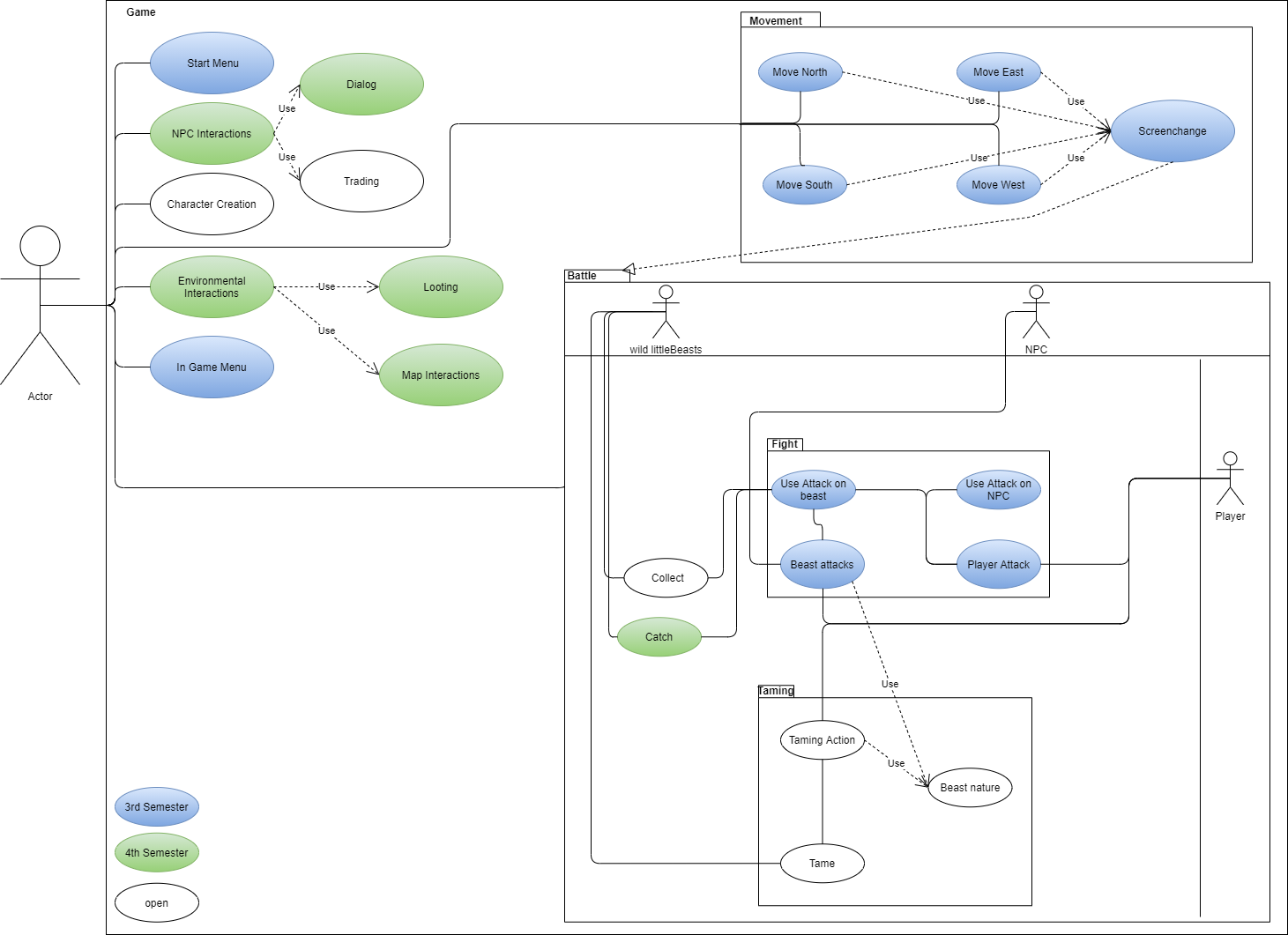
This catch use case gives users the possibility to catch littleBeasts. The actor can try to catch a beast, and the system checks if all preconditions are met and the give a chance of success. The preconditions include the actor being engaged in the battle and having the required item to catch a beast( e.g. a cage). After that the system checks if the player has a free slot for the caught beast. When there is a free slot, the new beast is added to it. If not, the player can choose to release a beast from one of the slot or discard the newly aquired beast.
Our Project is seperated into two parts:
- The Calculation Engine (CE): this part of the project handles all calculations needed for game actions(e. g. catch, attack, tame) in the background.
- LittleBeasts: this part handles the graphical representation and interaction of the player with the game.
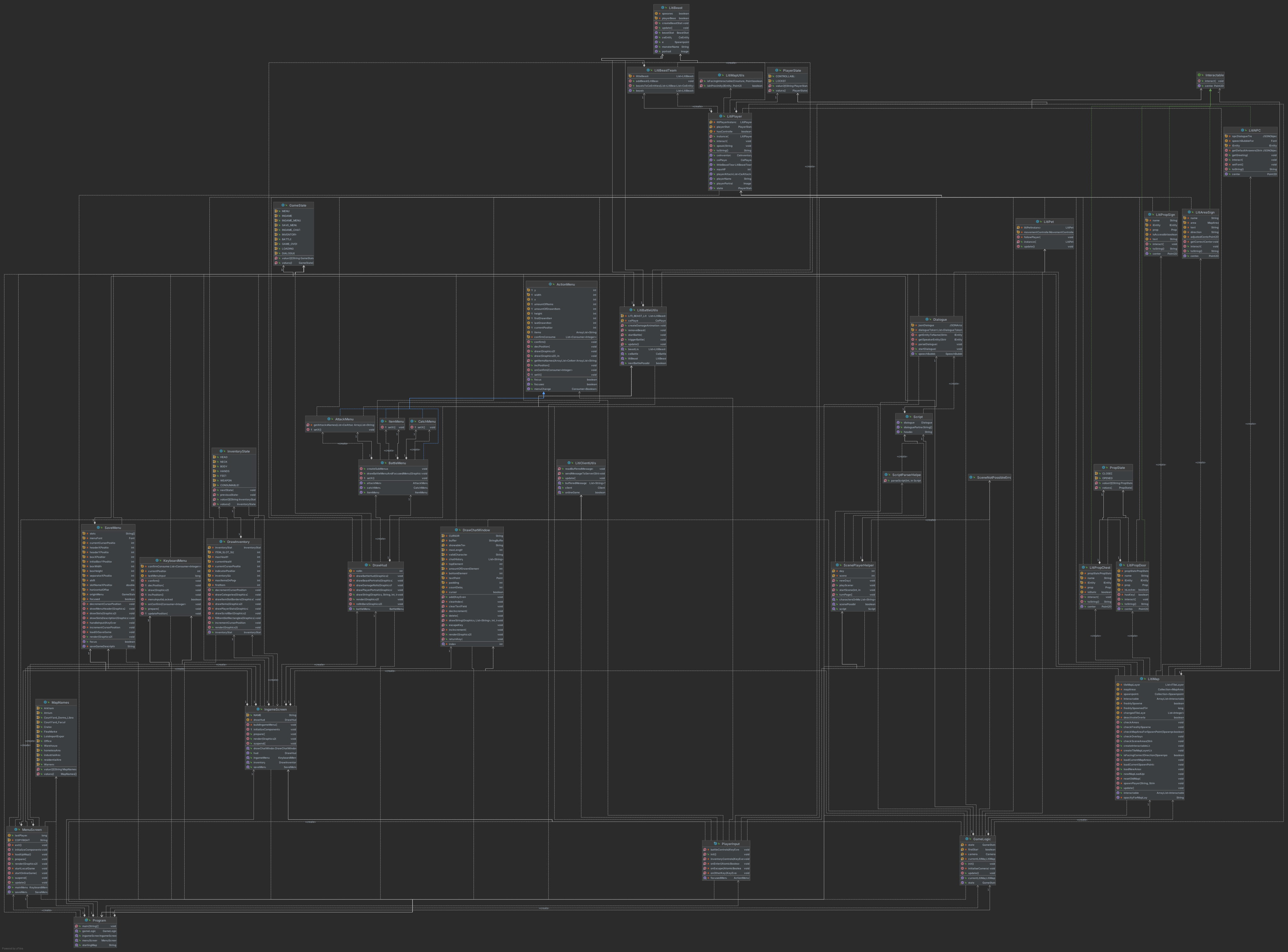
In our implementation the code is organized in packages for every functionality (e.g. Battle Menus, Game Logic, GUI Components, Entities).
This diagram gives an overview of the different functional packages, their classes and the dependencies between them.
(n/a)
Due to the java architecture used in the development, the game can be deployed on every viable computer with JRE.

(n/a)
(n/a)
(n/a)
*The current version of the game(1.2.0) has a size of 17.3 MB. *The performance of the game is adequate on every Windows PC.
Our architecture will provide a framework to easily implement the story of the game. All content can be altered and extended through JSON-Files and designwork in Tiled/UtiLITI so there is no need to code in JAVA. In order to archive the best possible maintainability the application underlies a continous refactoring process.
Using pattern can be helpful to solve architectural problems in the code in a clean and maintainable way. In this blog post we used the design pattern Composite and Strategy. https://littlebeastsgame.wordpress.com/2021/05/17/week-2-6-design-pattern/
In this blog post we describe how a metrics tool can help you to improve and maintain code quality https://littlebeastsgame.wordpress.com/2021/05/31/week-2-7-metrics/