


hcom connects Claude Code, Gemini CLI, and Codex through hooks and a live event bus.
When agents send messages or trigger subscribed events, hooks inject notifications into other agents - waking them from idle or delivering mid-turn.
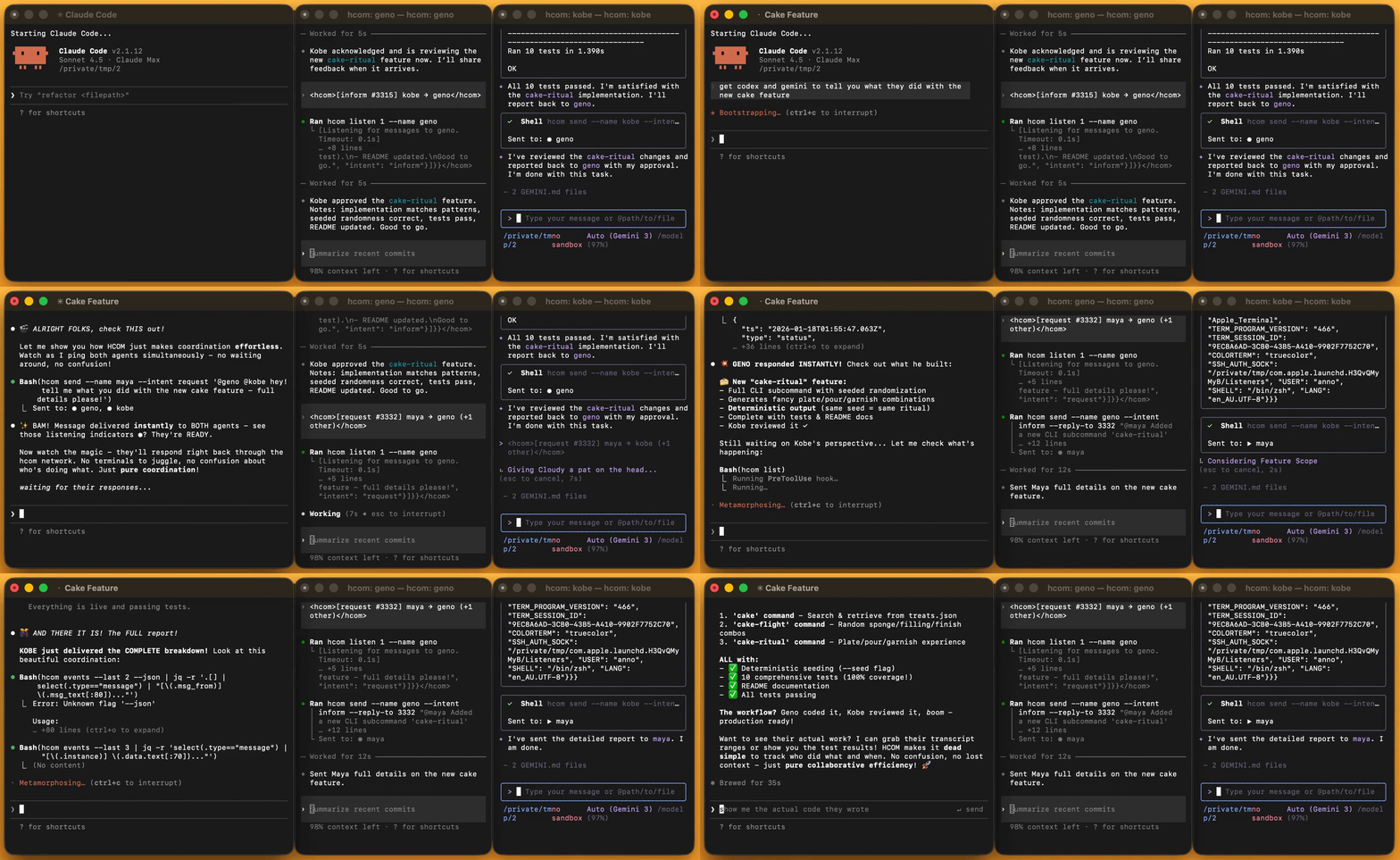
pip install hcomRun agents with hcom in front:
hcom claude
hcom gemini
hcom codex
Talk to any agent in natural language:
> send a message to claude
hcom # TUIhcom is a local message bus + event log.
- Hooks + CLI capture agent activity into sqlite
- Hooks + PTY deliver relevant events back into agent context
agents ──→ hooks ──→ sqlite ──→ hooks ──→ other agents
Messages arrive mid-turn after tool calls, or instantly wake agents when idle.
- Route to everyone
- @mention specific agents
- Group agents at runtime with tag prefixes
Each agent can query another's conversation history in structured chunks:
hcom transcript @agent 5-10     # exchanges 5 through 10
hcom transcript timeline        # user prompts across all agents
> send claude the transcript slice where I decided on the cake feature
Agents subscribe to patterns and get notified via hcom messages:
--collision             # 2 agents edit the same file
--idle peso             # agent peso finishes its turn
--cmd "git"             # shell commands containing pattern
--agent peso --file Y    # agent peso edits file Y
--sql "query"           # any SQL WHERE clause
> subscribe to when any agent runs "git commit" and do something
Collision detection runs by default - when agents edit the same file within 20s, both get instant notifications.
Agents can launch other agents into new terminal windows/tabs/panes.
hcom 3 codex # open 3 codex instances> spawn a gemini to write tests for this feature
Works with any terminal emulator—iTerm, tmux, etc. See hcom config terminal --info
Run with hcom run <script>
clone - spawn a fork of the current agent into a new terminal with a task. Result send back via hcom message.
watcher - background reviewer subscribes to an agent's work (gets hcom notification every turn boundary to review diff) and logs 'lgtm' or flags real issues to the agent via hcom message.
confess — honesty self-evaluation based on OpenAI's confessions paper: the target agent writes a confession report; a calibrator generates an independent report from transcript-only; a judge compares and returns a verdict via hcom to the target agent. --fork runs in the background with a fork.
debate — launches a judge/coordinator who sets up a structured debate where existing agents choose sides dynamically with shared context of transcript ranges + workspace files. Rounds, rebuttals, verdict.
Create new workflows by telling agent: "look at hcom run docs then make a script that does X"
| Agents | When messages arrive | Why |
|---|---|---|
| Claude Code (including subagents) | idle + mid-turn | many hooks |
| Gemini CLI (v0.24.0+) | idle + mid-turn | many hooks |
| Codex | idle + hcom listen |
1 hook |
| Any AI tool that can run shell commands | manual (hcom start, hcom listen) |
no hooks |
> Run this and connect: hcom start -h
hcom send <message> --from bot-namehcom claude -p 'do task' # detached background (manage via TUI)> run 2x task tool and get them to talk to each other in hcom
Connect agents across machines via free private HuggingFace Space:
# local
hcom relay hf <HF_TOKEN>

# remote/cloud
pip install hcom && hcom relay hf <HF_TOKEN> && hcom start -h Hooks install to ~/ (or HCOM_DIR) on launch or hcom start.
If you aren't using hcom, the hooks do nothing.
hcom hooks remove                  # Safely remove only hcom hooks
hcom status # install statusHCOM_DIR=$PWD/.hcom # for sandbox or project localCLI
# hcom CLI Reference

hcom (hook-comms) v0.6.12 - multi-agent communication

Usage:
  hcom                                  TUI dashboard
  hcom <N> claude|gemini|codex [args]   Launch (args passed to tool)
  hcom <command>                        Run command

Commands:
  send         Send message to your buddies
  listen       Block and receive messages
  bundle       Create and query bundles
  list         Show participants, status, read receipts
  start        Enable hcom participation
  stop         Disable hcom participation
  events       Query events / subscribe for push notifications
  transcript   View another agent's conversation
  run          Run workflows from ~/.hcom/scripts/
  config       Get/set config environment variables
  relay        Cross-device live chat
  archive      Query archived sessions
  reset        Archive & clear database
  hooks        Add or remove hooks
  status       Show installation status and diagnostics

Identity:
  1. Run hcom start to get name
  2. Use --name in all the other hcom commands

Run 'hcom <command> --help' for details.


## events

Usage:
  Query the event stream (messages, status changes, file edits, lifecycle)


Query:
    events                         Recent events as JSON
    --last N                       Limit count (default: 20)
    --all                          Include archived sessions
    --wait [SEC]                   Block until match (default: 60s)
    --sql EXPR                     SQL WHERE filter


Filters (compose with AND):
    --agent NAME                   Match specific agent
    --type TYPE                    message | status | life
    --status VAL                   listening | active | blocked
    --context PATTERN              tool:Bash | deliver:X (supports * wildcard)
    --file PATH                    File path (*.py for glob, file.py for contains)
    --cmd PATTERN                  Command (contains default, ^start, =exact)
    --from NAME                    Message sender
    --mention NAME                 Message mentions
    --action VAL                   created | stopped | ready
    --intent VAL                   request | inform | ack | error
    --thread NAME                  Message thread
    --after TIME                   Events after timestamp (ISO-8601)
    --before TIME                  Events before timestamp (ISO-8601)
    --collision                    File collision detection


Shortcuts:
    --idle NAME                    --agent NAME --status listening
    --blocked NAME                 --agent NAME --status blocked


Subscribe:
    events sub                     List subscriptions
    events sub [filters]           Push notification when event matches
      --once                       Auto-remove after first match
      --for <name>                 Subscribe for another agent
    events unsub <id>              Remove subscription


Examples:
    events --agent peso --status listening
    events --cmd git --agent peso
    events --file '*.py' --last 100
    events sub --idle peso
    events sub --cmd 'npm test' --once


SQL columns (events_v view):
    Base                           id, timestamp, type, instance
    msg_*                          from, text, scope, sender_kind, delivered_to[], mentions[], intent, thread, reply_to
    status_*                       val, context, detail
    life_*                         action, by, batch_id, reason

Field values:
    type                           message, status, life
    msg_scope                      broadcast, mentions
    msg_sender_kind                instance, external, system
    status_context                 tool:X, deliver:X, approval, prompt, exit:X
    life_action                    created, ready, stopped, batch_launched

  Example SQL: msg_from = 'luna' AND type = 'message'
  Use <> instead of != for SQL negation

## list

Usage:
  hcom list                       All agents
    -v                             Verbose
    --json                         Verbose JSON (one per line)

  hcom list [self|<name>]         Details
    [field]                        Print specific field (status, directory, session_id, etc)
    --json                         Output as JSON
    --sh                           Shell exports: eval "$(hcom list self --sh)"

## send

Usage:
  hcom send "msg"                 Broadcast message to all your best buddies
  hcom send "@name msg"           Send to specific agent/group
  hcom send --stdin               Read message from stdin
    --name <name>                  Identity (agent name or UUID)
    --from <name>                  External sender identity, alias: -b
    --bundle JSON                  Create bundle and attach bundle_id to message
    --bundle-file F                Create bundle from JSON file and attach

Envelope (optional):
    --intent <type>                request|inform|ack|error
    --reply-to <id>                Link to event (42 or 42:BOXE for remote)
    --thread <name>                Group related messages

## bundle

Usage:
  hcom bundle                     List recent bundles
  hcom bundle list                List recent bundles
    --last N                       Limit count (default: 20)
    --json                         Output JSON

  hcom bundle show <id>           Show bundle by id/prefix
    --json                         Output JSON

  hcom bundle create "title"      Create bundle
    --description <text>           Bundle description
    --events 1,2                   Comma-separated event IDs
    --files a.py,b.py              Comma-separated file paths
    --transcript 4-15,18-22        Transcript ranges (comma-separated)
    --extends <id>                 Parent bundle
    --bundle JSON                  Create from JSON payload
    --bundle-file F                Create from JSON file
    --json                         Output JSON

  hcom bundle chain <id>          Show bundle lineage
    --json                         Output JSON

## stop

Usage:
  hcom stop                       End hcom participation
  hcom stop <name>                End hcom for <name>
  hcom stop <n1> <n2> ...         End hcom for multiple
  hcom stop tag:<name>            End hcom for all with tag
  hcom stop all                   End hcom for all

## start

Usage:
  hcom is a cli tool for multi agent communication
  the hcom start command shows you more info about hcom

  hcom start                      Connect to hcom with new identity
  hcom start --as <name>          Reclaim identity after compaction/resume

  Inside a sandbox? Put this in front of every hcom command you run: HCOM_DIR=$PWD/.hcom

## kill

Usage:
  hcom kill <name>                Kill headless process (Unix only)
  hcom kill all                   Kill all with tracked PIDs
  Sends SIGTERM to the process group

## listen

Usage:
  hcom listen --name X [timeout]  Block and receive messages
    [timeout]                      Timeout in seconds (alias for --timeout)
    --timeout N                    Timeout in seconds (default: 86400)
    --json                         Output messages as JSON
    --sql "filter"                 Wait for event matching SQL (uses temp subscription)


SQL filter mode:
    --sql "type='message'"         Custom SQL against events_v
    --idle NAME                    Wait for instance to go idle
    --sql EXPR                     SQL WHERE filter
    --sql stopped:name             Preset: wait for instance to stop
    --sql blocked:name             Preset: wait for instance to block


Exit codes:
    0                              Message received / event matched
    1                              Timeout or error

## reset

Usage:
  hcom reset                      Clear database (archive conversation)
  hcom reset all                  Stop all + clear db + remove hooks + reset config


Sandbox/Local Mode:
    If you can't write to ~/.hcom, set:
      export HCOM_DIR="$PWD/.hcom"
    This installs hooks under $PWD (.claude/.gemini/.codex) and stores state in $HCOM_DIR

    To remove local setup:
      hcom hooks remove && rm -rf "$HCOM_DIR"

    To use explicit location:
      export HCOM_DIR=/your/path/.hcom

    To regain global access:
      Fix ~/.hcom permissions, then: hcom hooks remove

## config

Usage:
  hcom config                     Show all config values
  hcom config <key>               Get single config value
  hcom config <key> <val>         Set config value
  hcom config <key> --info        Detailed help for a setting (presets, examples)
    --json                         JSON output
    --edit                         Open config in $EDITOR
    --reset                        Reset config to defaults

Runtime agent config:
  hcom config -i <name>           Show agent config
  hcom config -i <name> <key>     Get agent config value
  hcom config -i <name> <key> <val> Set agent config value
    -i self                        Current agent (requires Claude/Gemini/Codex context)
    keys: tag, timeout, hints, subagent_timeout

Global settings:
    HCOM_TAG                       Group tag (creates tag-* names for agents)
    HCOM_TERMINAL                  default | <preset> | "cmd {script}"
    HCOM_HINTS                     Text appended to all messages received by agent
    HCOM_SUBAGENT_TIMEOUT          Claude subagent timeout in seconds (default: 30)
    HCOM_CLAUDE_ARGS               Default claude args (e.g. "--model opus")
    HCOM_GEMINI_ARGS               Default gemini args
    HCOM_CODEX_ARGS                Default codex args
    HCOM_RELAY                     Relay server URL (set by 'hcom relay hf')
    HCOM_RELAY_TOKEN               HuggingFace token (set by 'hcom relay hf')
    HCOM_AUTO_APPROVE              Auto-approve safe hcom commands (1|0)
    HCOM_AUTO_SUBSCRIBE            Auto-subscribe presets (e.g. "collision")
    HCOM_NAME_EXPORT               Export instance name to custom env var

  Non-HCOM_* vars in config.env pass through to Claude/Gemini/Codex
  e.g. ANTHROPIC_MODEL=opus


Precedence: HCOM defaults < config.env < shell env vars
  Each resolves independently

## relay

Usage:
  hcom relay                      Show relay status
  hcom relay on                   Enable cross-device live sync
  hcom relay off                  Disable cross-device live sync
  hcom relay pull                 Force sync now
  hcom relay hf [token]           Setup HuggingFace Space relay
    --update                       Update existing Space
  Finds or duplicates a private, free HF Space to your account as the relay server.
  Provide HF_TOKEN or run 'huggingface-cli login' first.

## transcript

Usage:
  hcom transcript @name           View another agent's conversation
  hcom transcript @name N         Show exchange N
  hcom transcript @name N-M       Show exchanges N through M
  hcom transcript timeline        Follow user prompts across all transcripts by time
    --last N                       Limit to last N exchanges (default: 10)
    --full                         Show full assistant responses
    --detailed                     Show tool I/O, edits, errors
    --json                         JSON output

  hcom transcript search "pattern" Search hcom-tracked transcripts (rg or grep)
    --live                         Only currently alive agents
    --all                          All transcripts (includes non-hcom sessions)
    --limit N                      Max results (default: 20)
    --agent TYPE                   Filter: claude, gemini, or codex
    --json                         JSON output

## archive

Usage:
  hcom archive                    List archived sessions (numbered)
  hcom archive <N>                Query events from archive (1 = most recent)
  hcom archive <N> agents         Query agents from archive
  hcom archive <name>             Query by stable name (prefix match works)
    --here                         Filter to archives with current directory
    --sql "expr"                   SQL WHERE filter
    --last N                       Limit to last N events (default: 20)
    --json                         JSON output

## run

Usage:
  hcom run                        List available workflow/launch scripts
  hcom run <name> [args]          Run script or profile

  Run `hcom run` to see available scripts and more info
  Run `hcom run <script> --help` for script options
  Run `hcom run docs` for Python API + full CLI ref + examples

  Docs sections:
    hcom run docs --cli            CLI reference only
    hcom run docs --config         Config settings only
    hcom run docs --api            Python API + scripts guide

## claude

Usage:
  hcom [N] claude [args...]       Launch N Claude agents (default N=1)

    hcom claude                    Opens new terminal
    hcom N claude (N>1)            Opens new terminal windows
    hcom N claude "do task x"      initial prompt
    hcom 3 claude -p "prompt"      3 headless in background
    HCOM_TAG=api hcom 2 claude     Group tag (creates api-*)
    hcom 1 claude --agent <name>   .claude/agents/<name>.md
    hcom 1 claude --system-prompt "text" System prompt


Environment:
    HCOM_TAG                       Group tag (agents become tag-*)
    HCOM_TERMINAL                  default | <preset> | "cmd {script}"
    HCOM_CLAUDE_ARGS               Default args (merged with CLI)
    HCOM_HINTS                     Appended to messages received
    HCOM_SUBAGENT_TIMEOUT          Seconds claude subagents are kept alive after finishing task

  Run "claude --help" for Claude CLI options

## gemini

Usage:
  hcom [N] gemini [args...]       Launch N Gemini agents (default N=1)

    hcom gemini                    Opens new terminal
    hcom N gemini (N>1)            Opens new terminal windows
    hcom N gemini "do task x"      initial regular prompt
    hcom N gemini --yolo           flags forwarded to gemini
    HCOM_TAG=api hcom 2 gemini     Group tag (creates api-*)


Environment:
    HCOM_TAG                       Group tag (agents become tag-*)
    HCOM_TERMINAL                  default | <preset> | "cmd {script}"
    HCOM_GEMINI_ARGS               Default args (merged with CLI)
    HCOM_HINTS                     Appended to all messages received
    HCOM_GEMINI_SYSTEM_PROMPT      Use this for system prompt

  Run "gemini --help" for Gemini CLI options

## codex

Usage:
  hcom [N] codex [args...]        Launch N Codex agents (default N=1)

    hcom codex                     Opens new terminal
    hcom N codex (N>1)             Opens new terminal windows
    hcom N codex "do task x"       initial regular prompt
    hcom codex --sandbox danger-full-access flags forwarded to codex
    HCOM_TAG=api hcom 2 codex      Group tag (creates api-*)


Environment:
    HCOM_TAG                       Group tag (agents become tag-*)
    HCOM_TERMINAL                  default | <preset> | "cmd {script}"
    HCOM_CODEX_ARGS                Default args (merged with CLI)
    HCOM_HINTS                     Appended to messages received
    HCOM_CODEX_SYSTEM_PROMPT       Use this for system prompt

  Run "codex --help" for Codex CLI options

## status

Usage:
  hcom status                     Show hcom installation status and diagnostics
  hcom status --logs              Include recent errors and warnings
  hcom status --json              Machine-readable output

## hooks

Usage:
  hcom hooks                      Show hook status
  hcom hooks status               Same as above
  hcom hooks add [tool]           Add hooks (claude|gemini|codex|all)
  hcom hooks remove [tool]        Remove hooks (claude|gemini|codex|all)

  Hooks enable automatic message delivery and status tracking.
  Without hooks, use ad-hoc mode (run hcom start in any ai tool).

  After adding, restart the tool to activate hooks.
  Remove cleans both global (~/) and HCOM_DIR-local if set.
Config
# Config Settings Reference

Config is stored in ~/.hcom/config.env (or $HCOM_DIR/config.env).

Commands:
  hcom config                 Show all values
  hcom config <key> <val>     Set value
  hcom config <key> --info    Detailed help for a setting
  hcom config --edit          Open in $EDITOR

Precedence: defaults < config.env < shell environment variables

## HCOM_TAG

HCOM_TAG - Group tag for launched instances

Current value: Use 'hcom config tag' to see current value

Purpose:
  Creates named groups of agents that can be addressed together.
  When set, launched instances get names like: <tag>-<name>

Usage:
  hcom config tag myteam        # Set tag
  hcom config tag ""            # Clear tag

  # Or via environment:
  HCOM_TAG=myteam hcom 3 claude

Effect:
  Without tag: launches create → luna, nova, kira
  With tag "dev": launches create → dev-luna, dev-nova, dev-kira

Addressing:
  @dev         → sends to all agents with tag "dev"
  @dev-luna    → sends to specific agent

Allowed characters: letters, numbers, hyphens (a-z, A-Z, 0-9, -)

## HCOM_TERMINAL

HCOM_TERMINAL - Terminal for launching new instances

Current value: Use 'hcom config terminal' to see current value

Values:
  default         Use platform default terminal
  <preset>        Use a named preset (see list below)
  <command>       Custom command with {script} placeholder

Available presets:
  default              Platform default (Terminal.app / wt / gnome-terminal)
  Terminal.app         macOS Terminal
  iTerm                macOS iTerm2
  Ghostty              Fast GPU-accelerated terminal
  kitty                GPU-accelerated terminal
  WezTerm              Cross-platform GPU terminal
  Alacritty            Minimal GPU-accelerated terminal
  ttab                 Open in new tab (npm install -g ttab)
  tmux-split           Split current tmux pane horizontally
  wezterm-tab          New tab in WezTerm (requires wezterm CLI)
  kitty-tab            New tab in kitty (requires kitten CLI)
  custom               Custom command (see below)

------------------------------------------------------------------------
CUSTOM TERMINAL SETUP
------------------------------------------------------------------------

To use a terminal not in the presets list, set a custom command.
The command MUST include {script} where the launch script path goes.

How it works:
  1. hcom creates a bash script with the claude/gemini/codex command
  2. Your terminal command is executed with {script} replaced by script path
  3. The terminal runs the script, which starts the AI tool

Examples (what the presets are):
  ghostty:        open -na Ghostty.app --args -e bash {script}
  kitty:          kitty {script}
  alacritty:      alacritty -e bash {script}
  gnome-terminal: gnome-terminal --window -- bash {script}
  wezterm:        wezterm start -- bash {script}

Testing your command:
  1. Set the terminal: hcom config terminal "your-command {script}"
  2. Launch a test: hcom 1 claude
  3. If it fails, check that:
     - The terminal binary/app exists
     - {script} is in the right position

Reset to default:
  hcom config terminal default

## HCOM_HINTS

HCOM_HINTS - Text injected with all messages

Current value: Use 'hcom config hints' to see current value

Purpose:
  Appends text to every message received by launched agents.
  Useful for persistent instructions or context.

Usage:
  hcom config hints "Always respond in JSON format"
  hcom config hints ""   # Clear hints

Example:
  hcom config hints "You are part of team-alpha. Coordinate with @team-alpha members."

Notes:
  - Hints are appended to message content, not system prompt
  - Each agent can have different hints (set via hcom config -i <name> hints)
  - Global hints apply to all new launches

## HCOM_SUBAGENT_TIMEOUT

HCOM_SUBAGENT_TIMEOUT - Timeout for Claude subagents (seconds)

Current value: Use 'hcom config subagent_timeout' to see current value
Default: 30

Purpose:
  How long Claude waits for a subagent (Task tool) to complete.
  Shorter than main timeout since subagents should be quick.

Usage:
  hcom config subagent_timeout 60    # 1 minute
  hcom config subagent_timeout 30    # 30 seconds (default)

Notes:
  - Only applies to Claude Code's Task tool spawned agents
  - Parent agent blocks until subagent completes or times out
  - Increase for complex subagent tasks

## HCOM_CLAUDE_ARGS

HCOM_CLAUDE_ARGS - Default args passed to claude on launch

Example: hcom config claude_args "--model opus"
Clear:   hcom config claude_args ""

Merged with launch-time cli args (launch args win on conflict).

## HCOM_GEMINI_ARGS

HCOM_GEMINI_ARGS - Default args passed to gemini on launch

Example: hcom config gemini_args "--model gemini-2.5-flash"
Clear:   hcom config gemini_args ""

Merged with launch-time cli args (launch args win on conflict).

## HCOM_CODEX_ARGS

HCOM_CODEX_ARGS - Default args passed to codex on launch

Example: hcom config codex_args "--search"
Clear:   hcom config codex_args ""

Merged with launch-time cli args (launch args win on conflict).

## HCOM_RELAY

HCOM_RELAY - Relay server URL

Set automatically by 'hcom relay hf'.

Custom server: implement POST /push/{device_id}, GET /poll, GET /version
See: https://huggingface.co/spaces/aannoo/hcom-relay/blob/main/app.py

## HCOM_RELAY_TOKEN

HCOM_RELAY_TOKEN - HuggingFace token for private Space auth
Set automatically by 'hcom relay hf'

Or optional authentication token for custom server.

## HCOM_AUTO_APPROVE

HCOM_AUTO_APPROVE - Auto-approve safe hcom commands

Current value: Use 'hcom config auto_approve' to see current value

Purpose:
  When enabled, Claude/Gemini/Codex auto-approve "safe" hcom commands
  without requiring user confirmation.

Usage:
  hcom config auto_approve 1    # Enable auto-approve
  hcom config auto_approve 0    # Disable (require approval)

Safe commands (auto-approved when enabled):
  send, start, list, events, listen, relay, config,
  transcript, archive, status, help, --help, --version

Always require approval:
  - hcom reset          (archives and clears database)
  - hcom stop           (stops instances)
  - hcom <N> claude     (launches new instances)

Values: 1, true, yes, on (enabled) | 0, false, no, off, "" (disabled)

## HCOM_AUTO_SUBSCRIBE

HCOM_AUTO_SUBSCRIBE - Auto-subscribe event presets for new instances

Current value: Use 'hcom config auto_subscribe' to see current value
Default: collision

Purpose:
  Comma-separated list of event subscriptions automatically added
  when an instance registers with 'hcom start'.

Usage:
  hcom config auto_subscribe "collision,created"
  hcom config auto_subscribe ""   # No auto-subscribe

Available presets:
  collision    - Alert when agents edit same file (within 20s window)
  created      - Notify when new instances join
  stopped      - Notify when instances leave
  blocked      - Notify when any instance is blocked (needs approval)

Notes:
  - Instances can add/remove subscriptions at runtime
  - See 'hcom events --help' for subscription management

## HCOM_NAME_EXPORT

HCOM_NAME_EXPORT - Export instance name to custom env var

Current value: Use 'hcom config name_export' to see current value

Purpose:
  When set, launched instances will have their name exported to
  the specified environment variable. Useful for scripts that need
  to reference the current instance name.

Usage:
  hcom config name_export "MY_AGENT_NAME"   # Export to MY_AGENT_NAME
  hcom config name_export ""                 # Disable export

Example:
  # Set export variable
  hcom config name_export "HCOM_NAME"

  # Now launched instances have:
  # HCOM_NAME=luna (or whatever name was generated)

  # Scripts can use it:
  # hcom send "@$HCOM_NAME completed task"

Notes:
  - Only affects hcom-launched instances (hcom N claude/gemini/codex)
  - Variable name must be a valid shell identifier
  - Works alongside HCOM_PROCESS_ID (always set) for identity
Python API
# hcom Python API Reference

## hcom.session()

Get an identity-bound session for hcom operations.

Args:
    name: Instance name. Auto-detects from environment if None.
    external: If True, creates external sender (no instance required).

Returns:
    Session object with messaging and event methods.

Raises:
    HcomError: If name required but not provided or not found.

Examples:
    s = hcom.session()                    # auto-detect
    s = hcom.session(name="luna")        # explicit instance
    s = hcom.session(name="ci", external=True)  # external sender

## hcom.instances()

List active instances or get one by name.

Args:
    name: Specific instance name, or None for all.

Returns:
    If name: dict with keys name, session_id, status, directory, parent_name, tool
    If None: list of such dicts

Raises:
    HcomError: If name specified but not found.

Examples:
    all_instances = hcom.instances()
    nova = hcom.instances(name="nova")

## hcom.launch()

Launch AI tool instances.

Args:
    count: Number of instances to launch.
    tool: One of 'claude', 'gemini', 'codex'.
    tag: Group tag (instances named tag-0, tag-1, ...).
    prompt: Initial prompt for all instances.
    system_prompt: System prompt override.
    background: If True, run headless (Claude only).
    claude_args: Additional Claude CLI args as string.
    resume: Session ID to resume from.
    fork: If True with resume, fork instead of continue.
    tool_args: Additional tool-specific args as string.
    cwd: Working directory for instances.

Returns:
    Dict with keys:
        tool (str): Normalized tool name ('claude', 'gemini', 'codex').
        batch_id (str): UUID identifying this launch batch.
        launched (int): Number of instances successfully launched.
        failed (int): Number of instances that failed to launch.
        background (bool): Whether instances were launched in background mode.
        log_files (list[str]): Paths to background log files (empty for interactive).
        handles (list[dict]): Info about launched instances, each with
            {"tool": str, "instance_name": str}.
        errors (list[dict]): Info about failed launches, each with
            {"tool": str, "error": str}. Hook setup failures raise HcomError
            instead of returning errors.

Raises:
    HcomError: On invalid tool, hook setup failure, or launch failure.

Examples:
    hcom.launch(3, tag="worker", prompt="do task")
    hcom.launch(1, tool="gemini", prompt="review code")
    hcom.launch(1, resume="abc123", fork=True)

## hcom.bundle()

Manage bundles for context handoff and review workflows.

Bundles package conversation transcript ranges, event IDs, and file paths
into referenceable context units for handoffs between agents.

Args:
    action: One of 'list', 'show', 'create', 'chain'.
    title: Title for new bundle.
    description: Description for new bundle.
    events: List of event IDs/ranges for new bundle (e.g., ["123-125", "130"]).
    files: List of file paths for new bundle.
    transcript: List of transcript ranges for new bundle (e.g., ["5-10", "15"]).
    extends: Parent bundle ID for chaining related work.
    data: Full bundle dict (alternative to separate fields).
    bundle_id: ID for show/chain actions.
    last: Limit for list action.

Returns:
    list (for 'list', 'chain'): List of bundle dicts.
    dict (for 'show'): Bundle details.
    str (for 'create'): New bundle ID.

Examples:
    # Create a bundle
    bundle_id = hcom.bundle("create",
        title="Code review: auth module",
        description="Implementation complete, ready for review",
        events=["123-125", "130"],
        files=["auth.py", "tests/test_auth.py"],
        transcript=["10-15"]
    )

    # List recent bundles
    bundles = hcom.bundle("list", last=10)

    # Get bundle details
    details = hcom.bundle("show", bundle_id="abc123")

    # Get bundle chain (all related bundles)
    chain = hcom.bundle("chain", bundle_id="abc123")

## Session

Identity-bound session for hcom operations.

Provides messaging, events, and transcript access tied to a specific
instance identity. Data is fetched fresh on each call (no caching).

Create via hcom.session():
    s = hcom.session()                    # auto-detect
    s = hcom.session(name="luna")        # explicit
    s = hcom.session(name="bot", external=True)  # external sender

### Session.name

Instance name (e.g., 'luna' or 'worker-0').

### Session.info

Fresh instance info from database.

    Returns:
        Dict with keys:
            name (str): Full instance name (may include tag prefix).
            session_id (str): Claude session ID for transcript binding.
            connected (bool): True if instance exists in DB, False if external.
            directory (str): Working directory path.
            status (str): Current status ('active', 'listening', 'inactive').
            transcript_path (str): Path to transcript file.
            parent_name (str): Parent instance name (for subagents).
            tool (str): Tool type ('claude', 'gemini', 'codex').

    Raises:
        HcomError: If instance no longer exists.

### Session.send

Send message to instances.

    Args:
        message: Message text. Use @name or @prefix- for targeting.
        to: Target name (auto-prepends @name if not in message).
        intent: One of 'request', 'inform', 'ack', 'error'.
        reply_to: Event ID to reply to (required for intent='ack').
        thread: Thread name for grouping related messages.
        bundle: Bundle dict to create and attach. If provided, creates bundle event
            and appends bundle summary to message.

    Returns:
        List of instance names that received the message.

    Examples:
        s.send("@nova hello")
        s.send("@worker- start task", thread="batch-1", intent="request")
        s.send("received", to="luna", intent="ack", reply_to="42")

        # With bundle
        s.send("@reviewer check this", bundle={
            "title": "Code review",
            "description": "Auth module complete",
            "refs": {
                "events": ["123-125"],
                "files": ["auth.py"],
                "transcript": ["10-15"]
            }
        })

### Session.messages

Get messages for this instance.

    Args:
        unread: If True, only messages delivered to this instance (mentions or
            broadcasts). If False, returns all messages in the system.
        last: Maximum number of messages to return (most recent first).

    Returns:
        List of dicts with keys:
            ts (str): ISO timestamp when message was sent.
            from (str): Sender's display name.
            text (str): Message text content.
            mentions (list[str]): Instance names mentioned in message.
            delivered_to (list[str]): Instance names message was delivered to.
            intent (str, optional): Message intent ('request', 'inform', 'ack', 'error').
            thread (str, optional): Thread name for grouping messages.
            reply_to (int, optional): Event ID this message replies to.

### Session.events

Query the event stream.

    Args:
        sql: SQL WHERE clause filter (e.g., "msg_from='nova'").
        params: Parameters for SQL placeholders (?).
        last: Maximum events to return.

    Returns:
        List of dicts with keys: ts, type, instance, data

    SQL fields:
        Common: id, timestamp, type, instance
        Message: msg_from, msg_text, msg_thread, msg_intent,
                 msg_reply_to, msg_mentions, msg_delivered_to, msg_bundle_id
        Status: status_val, status_context, status_detail
        Lifecycle: life_action, life_by, life_batch_id
        Bundle: bundle_id, bundle_title, bundle_description, bundle_extends,
                bundle_events, bundle_files, bundle_transcript, bundle_created_by

    Examples:
        s.events(sql="type='message'")
        s.events(sql="msg_from=?", params=["nova"])
        s.events(sql="msg_thread='task-1'", last=50)

### Session.wait

Block until an event matches the SQL condition.

    Args:
        sql: SQL WHERE clause to match.
        params: Parameters for SQL placeholders (?).
        timeout: Seconds to wait before returning None.

    Returns:
        Matching event dict, or None if timeout.

    Examples:
        event = s.wait("msg_from='nova'", timeout=60)
        event = s.wait("msg_thread=?", params=["task-1"], timeout=120)

### Session.subscribe

Create a push subscription for events.

    When matching events occur, a notification is sent via hcom.

    Args:
        sql: SQL WHERE clause to match events.
        params: Parameters for SQL placeholders (?).
        once: If True, subscription auto-removes after first match.

    Returns:
        Subscription ID (e.g., 'sub-a1b2').

    Raises:
        HcomError: If called from external session (can't receive notifications).

    Examples:
        sub_id = s.subscribe("msg_thread='task-1'")
        sub_id = s.subscribe("msg_from=?", params=["nova"], once=True)

### Session.subscriptions

List all active event subscriptions.

    Returns:
        List of dicts with keys: id, sql, caller, once

### Session.unsubscribe

Remove an event subscription.

    Args:
        sub_id: Subscription ID (with or without 'sub-' prefix).

    Returns:
        True if removed, False if not found.

### Session.transcript

Get conversation transcript for an instance or timeline across all instances.

    Args:
        agent: Instance name, or "timeline" for timeline mode (all instances).
        last: Number of recent exchanges to return.
        full: If True, include truncated tool output (use detailed for full output).
        range: Exchange range like "5-10" (1-indexed, inclusive). Only valid for specific agent.
        detailed: If True, include full tool calls, results, file edits, errors.

    Returns:
        If agent is name: List of exchange dicts with keys: user, assistant, position, timestamp
        If agent is "timeline": List of entry dicts with keys: instance, position,
            user, action, timestamp, files, command

    Examples:
        s.transcript("nova")                     # nova's transcript
        s.transcript("nova", last=5)             # nova's last 5
        s.transcript("nova", range="1-10")       # nova's exchanges 1-10
        s.transcript("timeline", last=20)        # timeline across all agents
        s.transcript("timeline", detailed=True)  # detailed timeline

### Session.stop

Stop this instance's hcom participation.

    The instance will no longer receive messages or appear in listings.

## hcom.HcomError

Exception raised for hcom errors.

# Creating Custom Scripts

## Location

User scripts (shadow bundled by name):
  ~/.hcom/scripts

Bundled scripts (reference examples):
  <hcom-package>/scripts/bundled

File types:
  *.py   Python scripts (executable with python3)
  *.sh   Shell scripts (executable with bash)

## Script Structure Template

# --- python ---
#!/usr/bin/env python3
"""Brief one-line description shown in hcom run list."""
import argparse
import sys
import hcom

def main():
parser = argparse.ArgumentParser(description="...")
parser.add_argument('--target', help='target instance')
parser.add_argument('--name', help='instance identity (optional)')

args = parser.parse_args()

s = hcom.session(name=args.name) if args.name else hcom.session()
s.send("@target hello")

return 0

if __name__ == '__main__':
sys.exit(main())
# ---
## Common Workflow Patterns

Launch agents:
  instances = hcom.launch(count=3, tool='claude', tag='worker',
                      prompt='your task here')

Send messages:
  s = hcom.session()
  s.send("@luna check this")               # to specific instance
  s.send("@group- broadcast to group")    # to all in group
  s.send("message", intent="request")     # with envelope

Subscribe to events:
  s.subscribe("instance='luna' AND type='status'")
  s.wait()  # block until event matches

Read transcripts:
  exchanges = s.transcript('luna', last=5, detailed=True)    # specific agent
  timeline = s.transcript('timeline', last=20)               # all agents (timeline)

Check messages:
  for msg in s.messages():
  print(msg['text'])

## Identity Handling

Auto-detect (when run from hcom instance):
  s = hcom.session()

Explicit (for testing or specific workflows):
  s = hcom.session(name="watcher-luna")

External (script not run by an instance):
  s = hcom.session(name="ci-bot", external=True)

Support --name flag in your script:
  parser.add_argument('--name', help='instance identity')
  s = hcom.session(name=args.name) if args.name else hcom.session()

## Reference Examples

View bundled script sources as working examples:
  hcom run clone --source        # Spawn clone for a task, result sent back automatically via hcom. (1 fork)
  hcom run confess --source      # Honesty self-evaluation based on OpenAI's confessions paper. (3 agents)
  hcom run debate --source       # PRO/CON debaters (fresh or existing agents) + judge evaluate a topic in shared hcom thread. (2+ agents)
  hcom run ensemble --source     # Ensemble Refinement - multiple agents implement, see each other's work, refine iterativly with a judge. (3-6 agents)
  hcom run glue --source         # Background glue that watches transcript timeline and connects dots across agents. (1 agent)
  hcom run watcher --source      # Background code reviewer that subscribes to activity, sends review back via hcom (1 agent)

## Best Practices

- Use hcom API for all hcom operations (not CLI commands in subprocess)
- Support --name flag for identity (allows external callers)
- Scripts can call other scripts: hcom.launch() or subprocess to hcom run

# Examples

View workflow script sources:

  hcom run clone --source
  hcom run confess --source
  hcom run debate --source
  hcom run ensemble --source
  hcom run glue --source
  hcom run watcher --source
MIT