Volume control with on-screen display notifications. Works with any window manager, such as i3wm, bspwm, and KDE, as a standalone script, or with statusbars such as polybar, i3blocks, i3status, and more.


Read the installation instructions to get started. For a specific usage:
Use your keyboard volume keys to increase, decrease, or mute your volume. If you have a volume indicator in your status line it will be updated to reflect the volume change. When notifications are enabled a popup will display the volume level.
| notify-osd | dunst | xob |
|---|---|---|
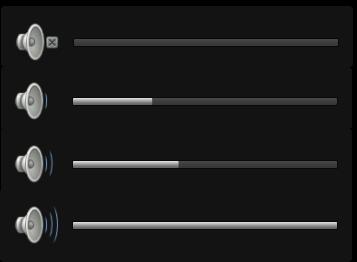 |
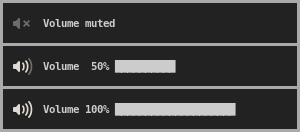 |
 |
| XOSD | herbe | volnoti |
|---|---|---|
 |
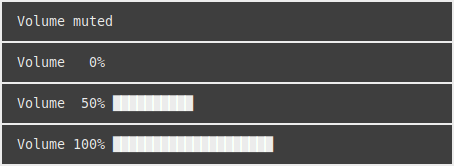 |
 |
| KOSD |
|---|
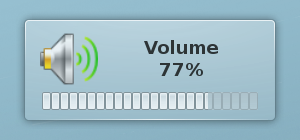 |
Read about notifications for more information.
i3-volume does not require any particular desktop environment and can be used as a standalone script.
Usage: ./volume [<options>] <command> [<args>]
Control volume and related notifications.

Commands:
  up <value>                  increase volume
  down <value>                decrease volume
  set <value>                 set volume
  mute                        toggle mute
  listen                      listen for changes to a PulseAudio sink
  output <format>             output volume in a supported format
                              custom format substitutions:
                                  %v = volume
                                  %s = sink name (PulseAudio only)
                                  %c = card (alsamixer only)
                                  %m = mixer (alsamixer only)
                                  %p = volume progress bar
                                  %i = volume icon/emoji
                                  %P = active port description (PulseAudio only)

                                  examples:
                                      "Volume is %v" = Volume is 50%
                                      "%i %v %p \n"  = 奔 50% ██████████
  outputs                     show available output formats
  notifications               show available notification methods
  help                        display help

Options:
  -a                          use amixer
  -n                          enable notifications
  -C                          use libcanberra for playing event sounds
  -P                          play sound for volume changes
  -j <muted,high,low,medium>  specify custom volume emojis as a comma separated list
  -t <process_name>           process name of status bar (requires -u)
  -u <signal>                 signal to update status bar (requires -t)
  -x <value>                  maximum volume
  -X <value>                  maximum amplification; if supported (default: 2)
  -h                          display help

amixer Options:
  -c <card>                   card number to control
  -m <mixer>                  set mixer (default: Master)

PulseAudio Options:
  -s <sink>                   symbolic name of sink
  -A <port:alias>             specify an alias for a port name (e.g., -A "Speakers:Living Room")

Notification Options:
  -N <method>                 notification method (default: libnotify)
  -p                          enable progress bar
  -L <placement>              progress bar placement (default: summary; requires -p)
                              placements:
                                  body
                                  summary
  -e <expires>                expiration time of notifications in ms
  -l                          use fullcolor instead of symbolic icons
  -S <suffix>                 append suffix to symbolic icon names
  -y                          use dunstify (default: notify-send)

Environment Variables:
  XOSD_PATH                   path to osd_cat
  HERBE_PATH                  path to herbe
  VOLNOTI_PATH                path to volnoti-show
  CANBERRA_PATH               path to canberra-gtk-play
  NOTIFY_PATH                 path to command that sends notifications
  NO_NOTIFY_COLOR             flag to disable colors in notifications
  USE_NOTIFY_SEND_PY          flag to use notify-send.py instead of notify-send
i3-volume also looks for a configuration file located at either ~/.config/i3-volume/config, or $XDG_CONFIG_HOME/i3-volume/config. You can use this file to set any variables that are not set in the command line. For example, if you want to always display notifications using dunst. You can add the following to your config file:
NOTIFICATION_METHOD="dunst"
DISPLAY_NOTIFICATIONS=true
Or if using i3blocks as your statusline and dunst for notifications, aliasing the analog-output-speaker port to Speaker and using fullcolor icons:
STATUSLINE="i3blocks"
SIGNAL="SIGRTMIN+10"
NOTIFICATION_METHOD="dunst"
USE_DUNSTIFY=true
DISPLAY_NOTIFICATIONS=true
USE_FULLCOLOR_ICONS=true
PORT_ALIASES[analog-output-speaker]=Speaker
Now every invocation of the script will use these settings, unless overridden by command line options. To find more variables, check the source code of the parse_opts and main functions.
Version 3 introduces commands which makes it incompatible with previous versions. Your command-line usage and/or configured hotkeys need to be updated to reflect this.
| Change | v2 | v3 |
|---|---|---|
-d is now the down command |
volume -d 5 |
volume down 5 |
-i is now the up command |
volume -i 5 |
volume up 5 |
-m is now the mute command |
volume -m |
volume mute |
-o is now the output command |
volume -o i3blocks |
volume output i3blocks |
-v is now the set command |
volume -v 5 |
volume set 5 |
-L is now the listen command |
volume -L |
volume listen |
-M is now the -m option |
volume -M Master |
volume -m Master |
i3-volume is capable of working with many other programs. The following lists a few with examples:
| Program | Note |
|---|---|
| i3blocks | See our example blocklet |
| i3status-rust | See our example custom block |
| xob | Requires extra steps for notifications. Guide |
| XOSD | Notifications require the -N xosd option. Example |
| herbe | Notifications require the -N herbe option. Example |
| volnoti | Notifications require the -N volnoti option. Example |
| KOSD | Notifications require the -N kosd option. Example |
| sxhkd | For keybindings with or without i3wm, often used with bspwm. Example |
Having a problem? Try reading our common issues or open an issue.
i3-volume is released under GNU General Public License v2
Copyright (C) 1989, 1991 Free Software Foundation, Inc.