

The open-source CRM for organizations on the ibl.ai platform.
People, organizations, deals, activities and tags — for every organization you belong to, with ibl.ai single sign-on and roles built in. One codebase. Every platform. Your data, your organization, your rules.





Hosted web app and published builds coming soon · today: run it locally or deploy it yourself · how builds are made
▶︎ Watch the intro video · Organizations, people, deals, activities and tags in under five minutes
Why ibl.ai/crm · Every platform · Features · Case studies · Screenshots · Quick Start · Deployment · Architecture
SOC 2 Type II · Universities, enterprises, and governments run on ibl.ai — read the case studies →
| 🔓 Your code, your data | MIT-licensed and self-hostable. The CRM records live in your ibl.ai organization, scoped by the platform's own multi-tenancy — no second database, no vendor lock-in. |
| 🏢 Every organization you own | Sign in once with ibl.ai SSO and switch between all of your organizations, exactly like os.ibl.ai. Each organization gets its own people, pipelines, deals and roles. |
| 🧭 The Twenty way, on ibl.ai | The information architecture of Twenty — objects in a sidebar, saved table & board views, favorites, record pages with a timeline and a history — built on the ibl.ai CRM API and SDK components. |
| 🌍 Four languages | English, Spanish, French and Chinese, following the language you chose in any other ibl.ai app. |
| 📱 Truly everywhere | One codebase for web, macOS, Windows, Linux, iOS and Android — native shells around the same app. The hosted web app and published builds are coming soon. |
| 🔐 Enterprise-ready | SSO (OAuth / OIDC / SAML via the platform), four seeded CRM roles (Viewer, User, Manager, Inviter), org-level notifications, invitations that turn leads into platform users. |
ibl.ai/crm meets your team wherever they are — the same product, native everywhere.
| Platform | Status | |
|---|---|---|
| Web | 🌐 | Coming soon at crm.ibl.ai — today, run it locally or deploy it yourself |
| macOS | 🍎 | Native app (universal .dmg, Intel + Apple Silicon) — built by the release workflow; downloads coming soon |
| Windows | 🪟 | Native app (x64 + ARM64 installer) — built by the release workflow; downloads coming soon |
| Linux | 🐧 | Native app (AppImage) — built by the desktop build workflow; downloads coming soon |
| iOS | 📱 | Native app — built by the iOS workflow; App Store listing coming soon |
| Android | 🤖 | Native app — built by the Android workflow; Google Play listing coming soon |
The native apps are Tauri 2 WebView shells around the hosted app (src-tauri/), so they load crm.ibl.ai and work once it is live — or point them at your own deployment (docs/development.md). They are built the same way iblai/os and iblai/lms ship. Sign-in on mobile goes through the system browser and returns via the iblai-crm:// deep link. See docs/platform-deployment.md.
|
👥 People & organizations
💼 Deals & pipelines
|
🗓️ Activities
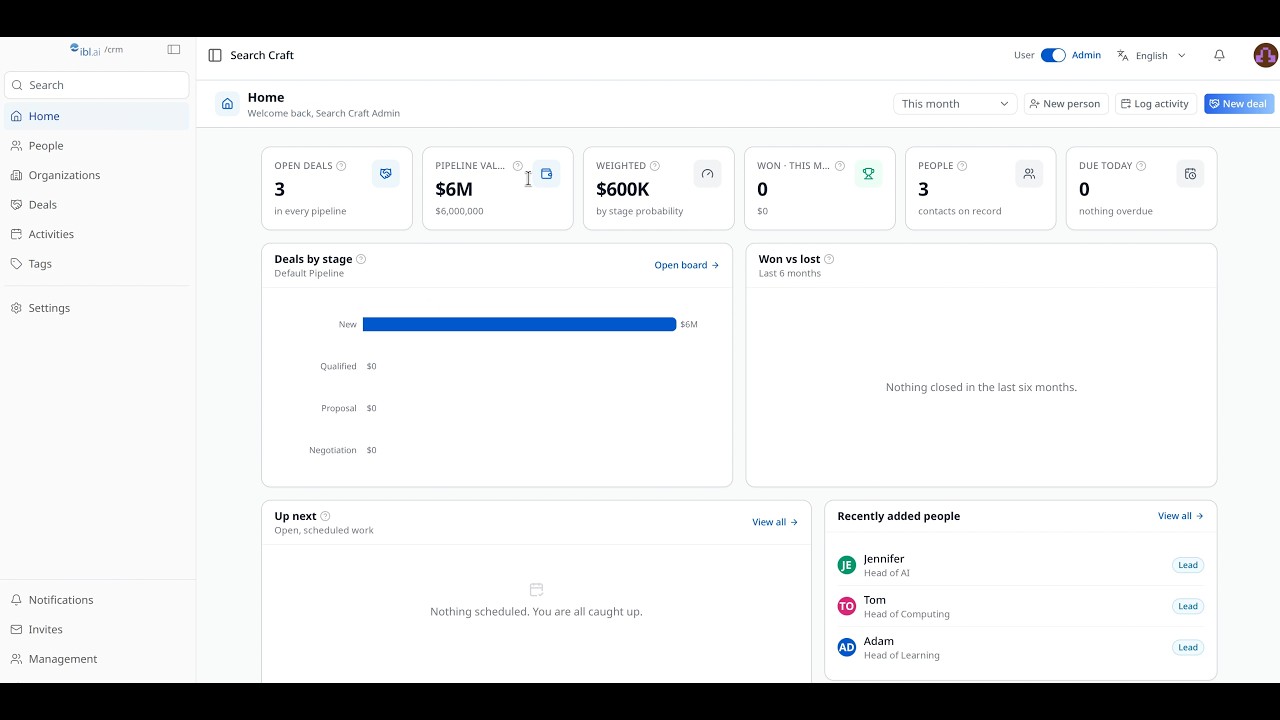
📊 Home
🏢 Operate & scale
|
Universities, enterprises, and government agencies build on ibl.ai — deploying agents on their own infrastructure, with their own models, at a fraction of the cost of closed platforms.
Screenshots of the seeded walkthrough organization are on their way — run pnpm screenshots to regenerate them into docs/images/ (see docs/development.md).
git clone https://github.com/iblai/crm.git
cd crm
pnpm install --ignore-scripts
pnpm dev
Open http://localhost:3000. It sends you to login.iblai.app, where Sign Up creates an organization at ibl.ai and brings you back signed in; you land on /platform/<your-org> — the CRM of the organization your session is scoped to. Use the switcher in the profile menu to move between organizations. A user whose only organization is the community one gets its trial-gated shell there, on a sample organization; an admin’s first visit opens the setup flow. See the full Development Guide for setup, scripts, architecture and configuration.
No configuration is required against hosted iblai.app: the service URLs default in lib/iblai/config.ts. Copy .env.example to .env.local only to point at a self-hosted platform or to change the community org (NEXT_PUBLIC_MAIN_TENANT_KEY, default main).
Using Claude Code? This repo ships with the iblai/vibe skills in mind — read AGENTS.md first.
Node.js 22+ and pnpm 12 (corepack enable picks the pinned version up from package.json).
Node.js 25+ note: the
devscript setsNODE_OPTIONS='--no-experimental-webstorage'so the SDK's browser-storage guards do not collide with Node's experimentallocalStorage. Keep that flag if you customize the script.
| Command | What it does |
|---|---|
pnpm dev |
Dev server on port 3000 |
pnpm build |
Production build (standalone output) |
pnpm start |
Serve the production build |
pnpm typecheck |
TypeScript 7 |
pnpm lint |
oxlint, under a warning budget (--max-warnings) |
pnpm format |
oxfmt (pnpm format:check in CI) |
pnpm i18n:check |
Same keys in the four catalogs; no “tenant”, no “company”, no ASCII apostrophe |
pnpm test |
Vitest unit tests (pnpm test:coverage in CI: 85 % lines on lib/) |
pnpm test:e2e |
Playwright journeys, Chromium and a phone (pnpm test:e2e:all for every browser) |
pnpm e2e:accounts |
Once: the two e2e test accounts in the throwaway organization iblai.env names |
pnpm e2e:coverage |
The journey registry (e2e/coverage.json) against the specs and the app's pages |
pnpm release |
release-it: version from the commits, CHANGELOG, tag, GitHub Release (CI runs it on every push to main) |
pnpm tauri:dev / tauri:build |
Desktop shell (needs Rust); pnpm tauri:dev:ios / tauri:dev:android for a simulator or emulator |
pnpm shell:smoke / shell:smoke:windows |
The shell headless against a local page: the navigation guard and both sign-in returns (CI runs the Linux one on every shell change) |
pnpm shell:touch / shell:touch:windows / shell:touch:ios / shell:touch:android |
The built shell on this machine (Linux, macOS, Windows), on an iOS simulator or on an Android phone, with the touch-test checklist (docs) |
pnpm shell:clear [android, ios] / shell:clear:windows |
Forgets the shell's cookies, localStorage and caches on this machine, the phone or the simulator, so the next touch test starts signed out |
ibl.ai/crm is a front end for the ibl.ai platform. The platform provides sign-in, organizations, roles, notifications and the CRM API; this repository provides the app.
-
Build and run with Node
pnpm build
cp -r public .next/standalone/ && cp -r .next/static .next/standalone/.next/
PORT=3000 node .next/standalone/server.js
The build is a standalone server, so
next startdoes not apply; the two copies are what the Dockerfile does. On Vercel nothing of this is needed: the project builds the regular Next.js output (vercel.jsonpins the preset) and only wantsENABLE_EXPERIMENTAL_COREPACK=1so pnpm 12 is used. -
Or run with Docker
docker build -t iblai-crm . docker run -p 3000:3000 iblai-crmNEXT_PUBLIC_*values are inlined at build time and.env*files stay out of the image, so a self-hosted platform passes its URLs as build arguments:--build-arg NEXT_PUBLIC_API_BASE_URL=https://api.example.com --build-arg NEXT_PUBLIC_AUTH_URL=https://login.example.com --build-arg NEXT_PUBLIC_PLATFORM_BASE_DOMAIN=example.com(omit them for hostediblai.app). The Dockerfile declares these three andNEXT_PUBLIC_MAIN_TENANT_KEY; any otherNEXT_PUBLIC_*setting needs anARGof its own there. -
Register the origin. Every origin the app runs on (
http://localhost:3000,https://crm.example.com, theiblai-crm://native scheme) must be an allowed redirect origin of the organizations that sign in, or the Auth SPA never returns. Ask your ibl.ai operator.
Set the service URLs in .env.local for pnpm dev and pnpm build, or as Docker build arguments (above); see Configuration. If you need the full backend, reach out at ibl.ai/contact for an enterprise license and deploy it with iblai/iblai-infra-cli.
Ship Web, macOS, Windows, Linux, iOS and Android pointed at your own deployment — one web codebase, with the native apps as WebView shells around it:
→ Platform deployment guide (per-surface build, backend config, release, store submission).
The Tauri shell reads two optional compile-time flags (Rust option_env!) and exposes them as commands; set them in the build shell before pnpm tauri build. The web app does not read these commands yet, so neither flag changes the app today — the organization lock and the in-app purchase UI are coming soon:
| Env var | Tauri command | Default | Effect |
|---|---|---|---|
IBL_TENANT |
get_locked_tenant → string |
"" (unlocked) |
Organization lock (coming soon): the organization a build is meant for. Empty = multi-org. |
IBL_ALLOW_IN_APP_PURCHASE |
allow_in_app_purchase → bool |
false |
In-app purchase UI (coming soon). Truthy: 1, true, yes, on. |
IBL_TENANT=acme pnpm tauri build # a build meant for the "acme" organizationAll app config is NEXT_PUBLIC_* and optional against hosted iblai.app. Defaults live in lib/iblai/config.ts.
| Variable | Default | Description |
|---|---|---|
NEXT_PUBLIC_API_BASE_URL |
https://api.iblai.app |
Consolidated API; /dm (CRM), /lms, /axd are derived from it |
NEXT_PUBLIC_AUTH_URL |
https://login.iblai.app |
The hosted Auth SPA |
NEXT_PUBLIC_PLATFORM_BASE_DOMAIN |
iblai.app |
Base domain; with no API base, services resolve to their own subdomains |
NEXT_PUBLIC_MAIN_TENANT_KEY |
main |
The community organization — the trial-gated shell for a user who belongs to nothing else |
NEXT_PUBLIC_IBL_PLATFORM |
crm |
app= sent to the Auth SPA (its crm app: CRM copy, Sign Up goes to registration) |
NEXT_PUBLIC_TAURI_CUSTOM_SCHEME |
iblai-crm |
Deep-link scheme the native shells return through after SSO |
NEXT_PUBLIC_DEFAULT_CURRENCY |
USD |
Currency preselected on new deals |
NEXT_PUBLIC_ENABLE_RBAC |
false |
Gate SDK admin surfaces on RBAC policies as well as the admin flag |
crm/
├── app/
│   ├── page.tsx                          # `/` → /platform/<session org>
│   ├── platform/[tenantKey]/             # everything inside one organization
│   │   ├── layout.tsx                    # sidebar + top bar shell (admin gate)
│   │   ├── page.tsx                      # Home dashboard
│   │   ├── people/ · organizations/      # lists + record pages (timeline · history)
│   │   ├── deals/                        # kanban · table · deal page
│   │   ├── activities/ · tags/           # timeline work · labels
│   │   ├── settings/                     # pipelines · stages · lead sources
│   │   └── notifications/[[...id]]/      # SDK NotificationDisplay
│   ├── sso-login-complete/               # SSO landing (outside the providers)
│   ├── mobile-sso-login/                 # native deep-link landing
│   └── api/auth-redirect/                # same-origin hop to the Auth SPA
├── components/crm/                       # sidebar, top bar, ⌘K, record widgets
├── components/ui/                        # shadcn/ui (Base UI) primitives
├── hooks/                                # useSession, useMembers
├── lib/crm/                              # CRM types · RTK Query slice · formatting · saved-view helpers
├── i18n/ · messages/                     # next-intl config · en/es/fr/zh catalogs
├── lib/iblai/                            # config · tenant resolution · auth helpers
├── providers/iblai-providers.tsx         # Redux > AuthProvider > TenantProvider
├── store/iblai-store.ts                  # SDK slices + crmApi
├── src-tauri/                            # Tauri 2 shell (macOS · Windows · Linux · iOS · Android)
├── e2e/ · __tests__/                     # Playwright journeys · Vitest
└── docs/                                 # deployment, downloads, development
User → React pages → RTK Query (lib/crm/api.ts) → https://api.iblai.app/dm/api/crm/…
                                    ↓                       Authorization: Token <dm_token>
                           @iblai/iblai-js SDK
                           ├── /web-utils        AuthProvider · TenantProvider · tenant switch
                           ├── /web-containers   profile dropdown · notifications · Account/Management
                           └── /data-layer       platform users · org metadata
Sign-in is the platform's hosted round trip (login.<domain>/login?app=crm&redirect-to=<origin>&tenant=<org> → /sso-login-complete?data=…). TenantProvider compares the organization in the URL with the one the session is scoped to and re-authenticates when they differ, handing back an org-scoped token pair. The CRM API infers the organization from that token — there is no ?platform_key= — so every record you see belongs to the organization in the URL. A route organization the user does not belong to is previewed — its name and logo, Join, Create Your Own Platform — while the app runs on their own organization underneath. On the community organization everyone browses the sample data. A signed-in user who holds no CRM role in the organization they entered is sent back to the one they came from, or to one they administer; with neither, to ibl.ai registration (the free plan ibl.ai/join resolves to), coming back signed in to the organization it created. Details: docs/development.md.
Ten Platform-scoped resources under /dm/api/crm/: persons, organizations, pipelines (with nested stages and stages/reorder/), lead-sources, deals (move-stage/, won/, lost/, the board/), activities (done/), tags (attach / detach on persons, organizations, deals), favorites and saved views — plus search/, overview/ and …/{id}/history/, and ?search= / ?ordering= / ?date_filter= on every list. Every organization is seeded with a default pipeline, six stages and four lead sources. The full contract lives in the iblai-api-crm and iblai-vibe-crm-overview skills of iblai/vibe. This release needs ibl-dm-pro 4.416.0 (ibl-dm-crm-app 1.3.0).
This project is covered by Vitest unit tests in __tests__/ and Playwright end-to-end journeys in e2e/. Run the journeys for any change so nothing regresses:
| Command | What it does |
|---|---|
pnpm test |
Vitest — formatting, saved views, permissions, organization resolution, SSO landing, config, the house journeys |
pnpm shell:smoke |
The Tauri shell headless (shell:smoke:windows on Windows): the navigation guard and both sign-in returns on a local page |
pnpm i18n:check |
en / es / fr / zh catalogs carry the same keys and the house vocabulary |
pnpm test:coverage |
The unit tests with the coverage gate CI runs |
pnpm e2e:accounts |
Once: an admin and a CRM User member in the throwaway organization iblai.env names |
pnpm test:e2e |
Playwright journeys, Chromium + a phone |
pnpm test:e2e:all |
The same journeys in every browser |
pnpm test:e2e:ui |
Interactive UI mode |
pnpm test:e2e:headed |
Run with a visible browser |
pnpm e2e:coverage |
The journey registry against the specs and the app’s pages |
See e2e/COVERAGE.md for current coverage. Coverage must not regress — add or update a journey whenever you change user-facing behavior.
The Playwright suite has the OS's shape — numbered journeys in e2e/journeys/, page objects, a coverage registry (e2e/coverage.json, e2e/COVERAGE.md) with a checker — and signs in once per browser through the real Auth SPA (e2e/auth.setup.ts) as the two accounts pnpm e2e:accounts creates in a throwaway organization, never main. Get that organization's iblai.env from /iblai-vibe-connect run from an empty directory with --origin http://localhost:3000 and move it here. Every record the journeys create is E2E-prefixed and swept at the end of the run. See e2e/README.md.
We welcome contributions! See CONTRIBUTING.md. If you use AI-assisted tooling, read AGENTS.md first — it explains the SDK-first component rule, the multi-organization model, and how to verify a change.
- Documentation
- Development Guide — setup, scripts, architecture, configuration
- Agentic OS · Agentic LMS — the sibling apps this CRM mirrors
- Vibe — the skills and SDK toolkit for building on ibl.ai
- @iblai/iblai-js — the ibl.ai SDK
- Twenty — the CRM whose product model inspired this one