


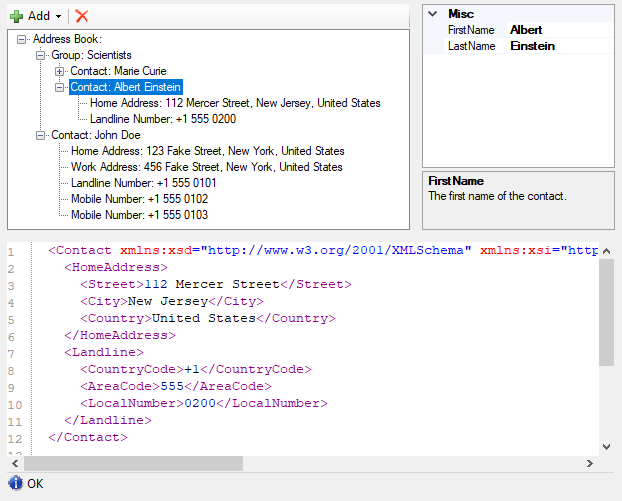
NanoByte Structure Editor is a WinForms library that helps you build split-screen editors for your data structures, consisting of:

- a collapsible tree-view of the data structure,
- a graphical editor for the currently selected node in the tree (
PropertyGridor custom) and - a text editor (based on ICSharpCode.TextEditor) with a serialized (e.g., XML or JSON) representation of the currently selected node.
This allows you to create an IDE-like experience for your users when editing complex domain specific languages, configuration files, etc..
Add a reference to the NanoByte.StructureEditor.WinForms NuGet package to your project. It is available for .NET Framework 4.5+ and .NET 8.0+.
Create an instance of StructureEditor<T> and add it to your Form:
var editor = new StructureEditor<MyData>();
Controls.Add(editor);
Alternatively, you may want to derive your own class from StructureEditor<T>. This will allow you to use the graphical WinForms designer in Visual Studio (which does not support generic types) to place the Editor on your Form.
public class MyDataEditor : StructureEditor<MyData>
{}
You need to "describe" your data structure to the Editor. You can do this directly after instantiating the editor or in the constructor of your derived class.
- Call
DescribeRoot()and then use the fluent API provided as a return value to describe the properties on your main data type. - Call
Describe<TContainer>()to describe the properties on a data typeTContainerexposed by another property. You can use multiple calls with different type parameters to describe arbitrarily deep hierarchies.
The fluent API provides the following methods:
.AddProperty()describes a property..AddRequiredProperty()describes a property that cannot be set tonull..AddPolymorphicProperty()describes a polymorphic property. After calling it you chain.AddElement()calls for each specific type the property can hold..AddRequiredPolymorphicProperty()describes a polymorphic property that cannot be set tonull..AddList()describes a list..AddPolymorphicList()describes a polymorphic list. After calling it you need to chain.AddElement()calls for each specific type of element the list can hold.
There are numerous overloads for each of these methods, e.g., allowing you to specify a custom editor control for a data type or to keep the auto-generated one.
editor.DescribeRoot("Address Book")
      .AddList("Group", x => x.Groups);
editor.Describe<IContactContainer>()
      .AddList("Contact", x => x.Contacts);
editor.Describe<Contact>()
      .AddRequiredProperty("Home Address", x => PropertyPointer.For(() => x.HomeAddress))
      .AddProperty("Work Address", x => PropertyPointer.ForNullable(() => x.WorkAddress))
      .AddPolymorphicList(x => x.PhoneNumbers)
      .AddElement("Landline Number", () => new LandlineNumber())
.AddElement("Mobile Number", () => new MobileNumber());Use the Open() method to load an XML file into the editor:
editor.Open(CommandManager<AddressBook>.Load(path));Use the Save() method on the CommandManager property to save the editor's content as an XML file:
editor.CommandManager.Save(path);The text editor uses XML by default. To use JSON instead, set the Serializer property:
editor.Serializer = JsonStructureSerializer.Instance; // System.Text.Json, .NET 8.0+ onlyTo load and save files in the same format, use SerializingCommandManager<T>. Passing one to Open() also sets the editor's Serializer:
editor.Open(SerializingCommandManager<AddressBook>.Load(path, JsonStructureSerializer.Instance));
editor.CommandManager.Save(path);
For Newtonsoft.Json (including on .NET Framework), add a reference to the NanoByte.StructureEditor.NewtonsoftJson NuGet package and use NewtonsoftJsonStructureSerializer.
Polymorphic lists and properties need extra attributes or settings to round-trip through JSON. See Serialization formats for details.
Take a look a the sample project for a more complete setup, including undo/redo functionality.
The source code is in src/, config for building the API documentation is in doc/ and generated build artifacts are placed in artifacts/. The source code does not contain version numbers. Instead the version is determined during CI using GitVersion.
To build install Visual Studio 2026 v18.0 or newer and run .\build.ps1.
We welcome contributions to this project such as bug reports, recommendations and pull requests.
This repository contains an EditorConfig file. Please make sure to use an editor that supports it to ensure consistent code style, file encoding, etc.. For full tooling support for all style and naming conventions consider using JetBrains' ReSharper or Rider products.