Open-source platform that replaces Crestron, Extron, and AMX.
Visual programming. Web-based touch panels. Community device drivers.
Free software. Your hardware.
Website • Documentation • Community Drivers • Cloud Platform
OpenAVC is a software-based AV control platform for professional audiovisual installations. It does what a Crestron processor, Extron controller, or AMX NetLinx system does, but it runs on hardware you already own and the software is completely free.
Program a conference room, lecture hall, worship space, or auditorium. Control projectors, displays, switchers, DSPs, cameras, and lighting from a web-based touch panel that runs on any tablet, phone, or wall-mounted display.
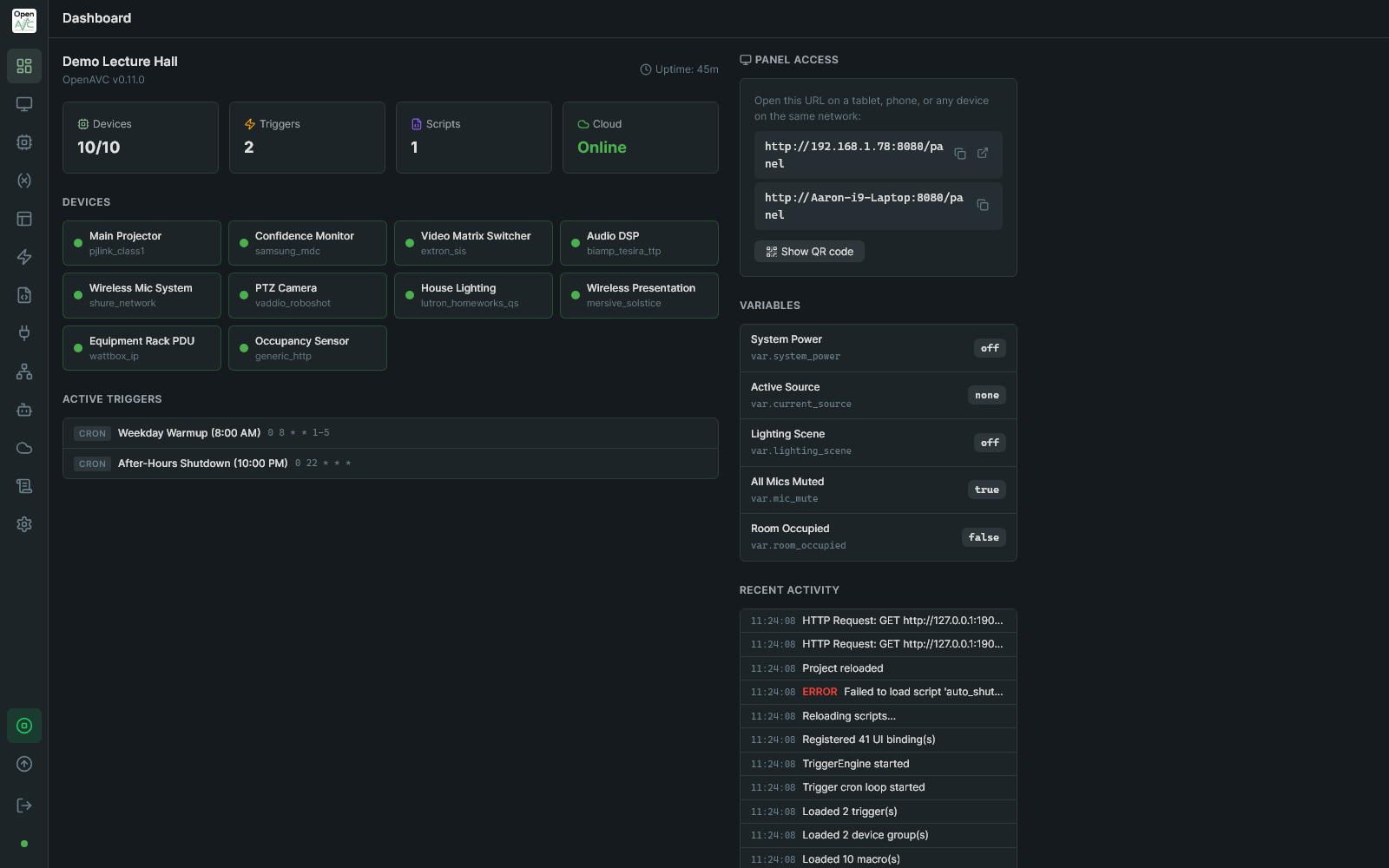
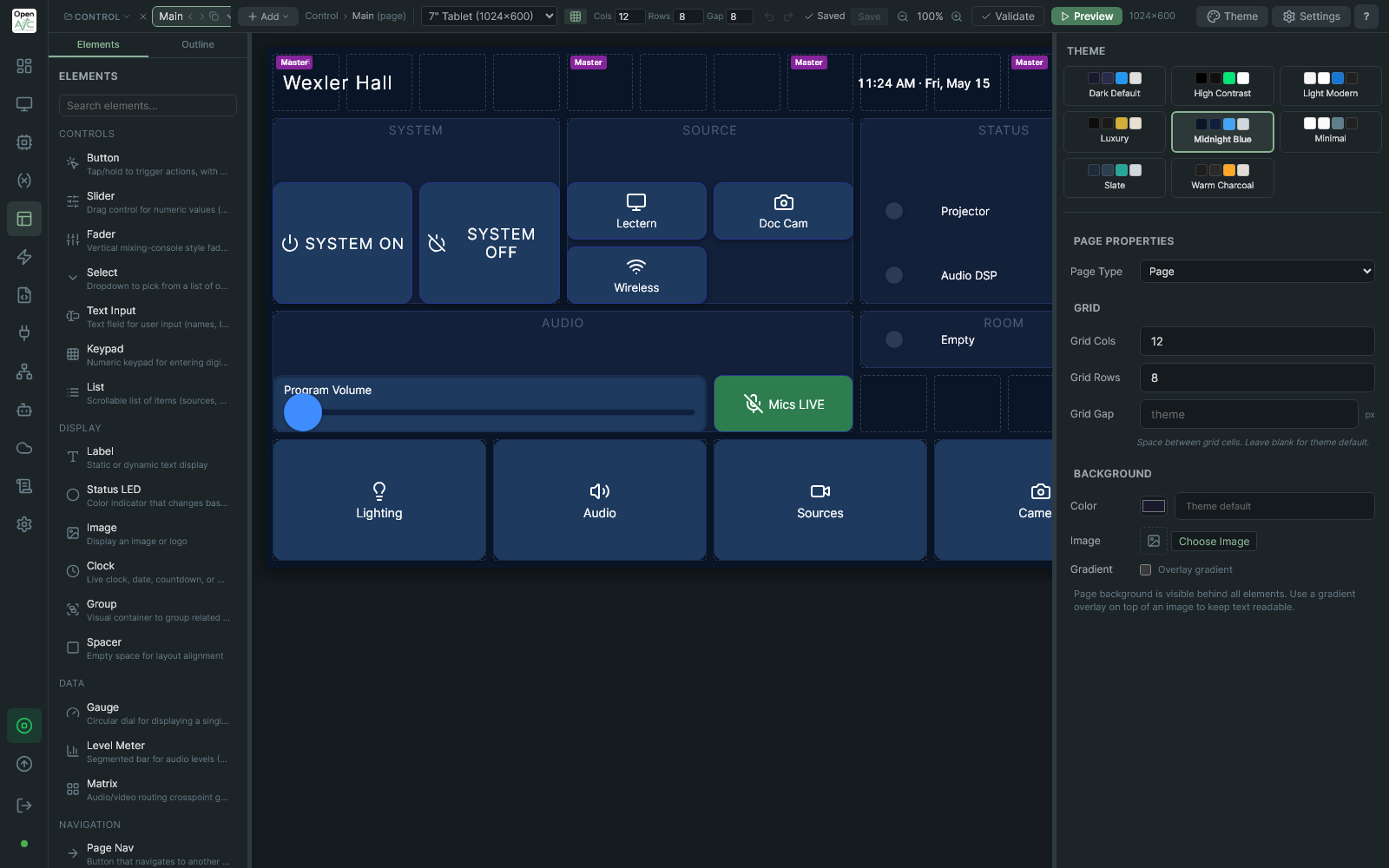
Programmer dashboard (left) and visual UI Builder (right). Click to view full size.
| Legacy AV Control | OpenAVC |
|---|---|
| Dedicated control processor per space | Deploy on a mini PC, rack server, Raspberry Pi, or Docker |
| Proprietary touch panels on every wall | Any iPad, Android tablet, kiosk display, or Stream Deck |
| SIMPL, NetLinx, or vendor-specific languages | Visual drag-and-drop builder, or Python when you need it |
| Wait for manufacturers to write device drivers | Community-maintained drivers, or build your own in YAML |
| Closed protocols that IT can't monitor or integrate | REST API, WebSocket, Python scripting. IT-friendly from day one |
| Annual licensing fees and dealer certifications | Free, open-source, MIT licensed. No per-space fees |
Visual Programming Build macros, triggers, and automation with a drag-and-drop interface. No code required for most spaces. When you need more, a full Python scripting engine is built in.
Touch Panel Designer Design touch panels visually with 18 element types, grid layouts, multiple pages, themes, and live preview. Panels are web-based and work on any device with a browser.
Community Drivers Browse and install device drivers from a shared community library, right from the programming interface. Projectors, displays, switchers, DSPs, cameras, and more. Or write your own in YAML (for text protocols) or Python (for anything else).
Run on Anything Raspberry Pi, Docker container, Windows PC, Linux server, VM, mini PC. OpenAVC is software, not a box. Deploy it on the hardware that makes sense for your installation.
Cloud Management (Optional) Monitor and manage all your spaces from a single dashboard. Remote access, alerts, fleet operations, and system health. Free tier included. Cloud is entirely optional.
Device Discovery Scan your network and OpenAVC finds your equipment automatically. Port scanning, protocol probes, mDNS, SSDP, SNMP, and intelligent driver matching.
Scheduling and Automation Time-based schedules, condition-based triggers with debounce and cooldown, and macro sequences. Automate power-on routines, after-hours shutdowns, or anything else your space needs.
Inter-System Communication Coordinate multiple OpenAVC instances across spaces, buildings, and campuses. Auto-discovery, shared state, and cross-system macro execution.
Download the installer from the Releases page. Installs as a Windows service with a system tray app. One click to open the Programmer IDE.
Flash the pre-built image to an SD card with Raspberry Pi Imager. Power on and access the Programmer at http://openavc.local:8080. Connect an HDMI touch display for a built-in touch panel.
Linux Docker hosts. On Windows or Mac, use the Windows installer instead — Docker Desktop's container networking can't reach AV equipment on your LAN.
curl -fsSL https://raw.githubusercontent.com/open-avc/openavc/main/installer/docker-compose.yml -o docker-compose.yml
docker compose up -dcurl -fsSL https://get.openavc.com | bashAfter installation, open a browser:
| Interface | URL |
|---|---|
| Programmer IDE | http://localhost:8080/programmer |
| Touch Panel | http://localhost:8080/panel |
Full documentation is available at docs.openavc.com.
- Getting Started - Install and build your first project
- Programmer Overview - IDE walkthrough and core concepts
- Devices and Drivers - Adding equipment and installing drivers
- UI Builder - Designing touch panels
- Macros and Triggers - Automation and event-driven control
- Scripting Guide - Python scripting API
- Creating Drivers - Build drivers in YAML or Python
- Deployment - Production deployment and configuration
- Discord - Chat, support, and discussion
- Community Drivers - Device drivers for projectors, displays, switchers, DSPs, cameras, and more
- Community Plugins - Extensions like Stream Deck integration, MQTT bridges, and custom control surfaces
- Cloud Platform - Remote monitoring, alerts, and fleet management
Contributions are welcome. See CONTRIBUTING.md for development setup and the pull request workflow. New to open source? Start with first-contributions.
OpenAVC is maintained by an AV system designer with 20 years in the industry, working with Crestron, Extron, and Q-SYS control systems. The project grew out of frustration with the tools available and a belief that there should be an open alternative.
This is currently a solo-maintained project. Contributions, feedback, and driver submissions are all welcome.
MIT License. See LICENSE for details.
Free to use, modify, and distribute. No per-space fees. No dealer certifications. No annual renewals.
"OpenAVC" and the OpenAVC logo are trademarks of OpenAVC LLC. The MIT License covers the source code but does not grant rights to these trademarks. See TRADEMARK.md for details.