
A concept exporter for the OpenTelemetry Collector that implements monitoring based on Calm Technology principles. Instead of traditional dashboards and alerts, OTel Sonifier creates a peripheral awareness system using rain and sky hue shifts that respond to telemetry in the background of our attention.
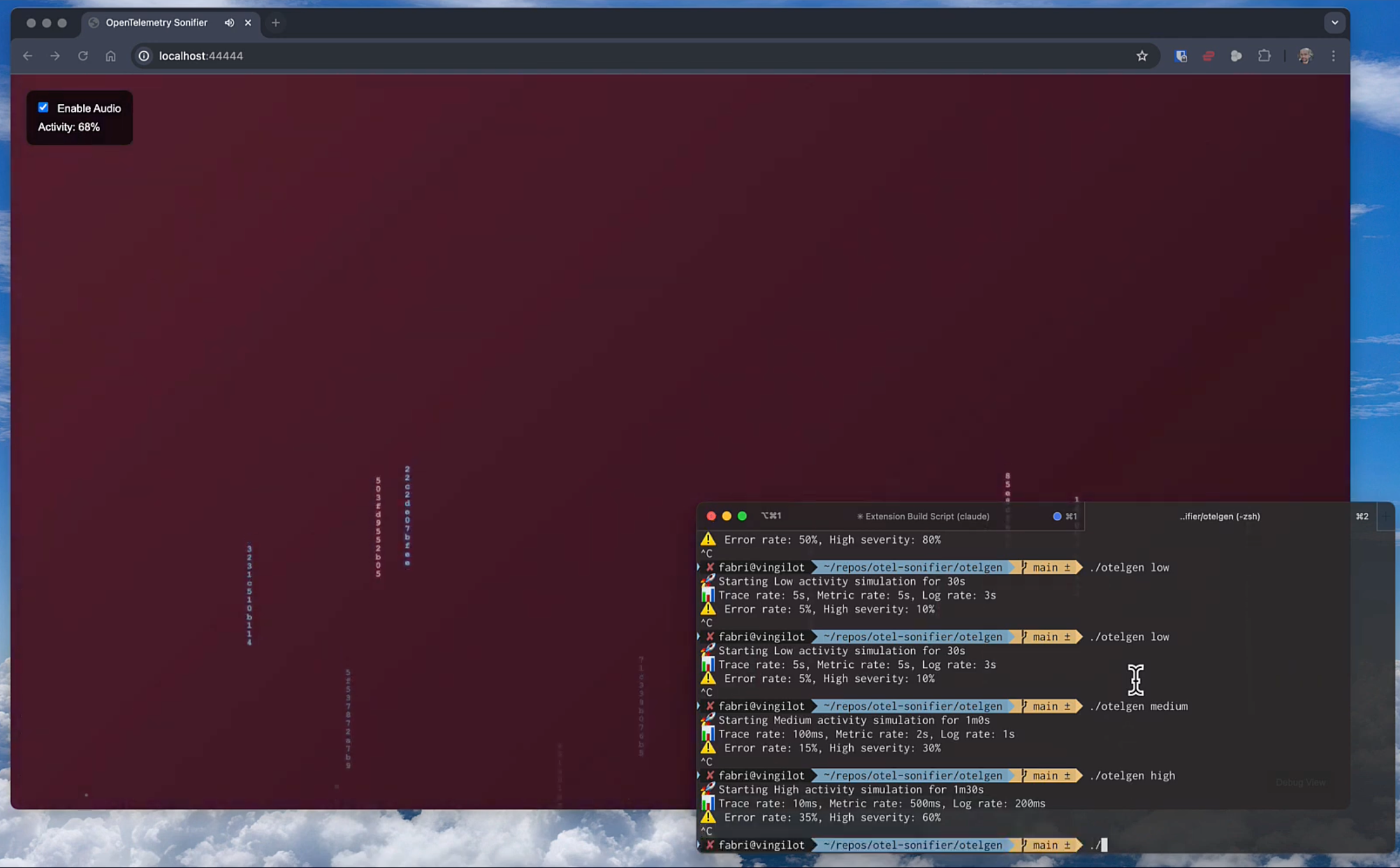
The goal is to make monitoring feel as natural as checking the weather: something we do without thinking, that provides immediate understanding of our environment.
OTel Sonifier embodies the principles of Calm Technology by making system health visible without demanding focus. Like weather patterns that we notice subconsciously, the exporter transforms telemetry data into environmental changes:
- Rain patterns represent requests: gentle drizzle for light traffic, intense downpour for heavy traffic. Rain drops are trace IDs, red when the request failed.
- Sky gradients shift from deep blue (calm) through purple and red to the darkest storm as conditions get worse than what is normal for your system.
- Audio feedback is rain you can hear: drops as traces land, a hiss that grows with traffic, muffling when the system gets slow, and distant thunder during error storms. An optional AI-generated soundscape follows the mood.
- Services each get their own band of the sky, and their own place in the stereo field, so you can tell where the weather is coming from.
The goal is to create a monitoring experience that feels more like observing nature than managing infrastructure.
The exporter turns telemetry into weather on the collector, and sends the UI a small update five times a second. Open Debug View (http://localhost:44444/debug) to see the latest one.
- Requests are root spans plus server and consumer spans. For them, the exporter measures rate, error rate, and p50/p95 latency over the last two seconds.
- The baseline is what normal looks like for your system, learned over about five minutes. Load and latency are judged against it, so a busy service that is always busy stays calm, and a sustained change gradually becomes the new normal.
- Scores run from 0 (calm) to 1 (stormy):
- Load: traffic above baseline (8x is 1).
- Latency: p95 above baseline (4x is 1).
- Errors: absolute error rate (31% is 1). Errors are bad even when they are usual.
- Saturation:
system.cpu.utilizationorsystem.memory.utilizationabove 70%. - Quiet: traffic far below baseline. Silence is worth noticing but is not a storm, so it does not affect the mood.
- Mood is the highest of the scores, smoothed over a few seconds. It drives the sky and the soundscape.
- Drops are a uniform sample of requests, at most 40 per update, so the share of red drops matches the error rate.
Enable Rain Sounds for synthesized rain:
- Drops tap as each raindrop lands, panned to its service's position. Failed requests land with a duller, lower tap.
- The rain bed is a steady hiss whose loudness follows the request rate, from silent at 0 req/s to full at 1000 req/s.
- The air muffles everything as p95 latency rises above its baseline, so a slow system sounds like rain heard through a window.
- Thunder rumbles in the distance, at most every 15 seconds, while errors are high.
Enable AI Soundscape for generative music from Lyria RealTime, which needs a Gemini API key. Your prompt sets the character of the music. As the mood worsens, a storm prompt is blended in with growing weight, and the music gets denser and darker. Updates are sent at most every two seconds. The key is stored in your browser only.
Run the automated build and setup script:
./build-and-run.shThis will:
- Install the OpenTelemetry Collector Builder (OCB), if needed.
- Build the otelgen load generator.
- Build a collector that includes the Sonifier exporter.
- Start the collector and print the web UI link and usage examples.
Building requires Go 1.26 or later. To build without running, use ./build.sh.
Start the collector with the provided configuration:
./otelcol-sonifier/otelcol-sonifier --config=collector-config.yamlThe collector will start with:
- OTLP receivers on ports 4317 (gRPC) and 4318 (HTTP)
- The Sonifier web UI on http://localhost:44444
Open the web UI, then generate some telemetry (see Usage). Browsers only play sound after you interact with the page, so tick Rain Sounds and, optionally, AI Soundscape in the top-left panel. The panel also shows the current mood and the request rate, error rate, and p95 latency. Debug View in the bottom-right corner shows the full weather update.
Point any OpenTelemetry SDK or collector at the OTLP receivers, for example:
export OTEL_EXPORTER_OTLP_ENDPOINT=http://localhost:4318To add the sonifier to an existing collector instead, build your distribution with the exporter from sonifierexporter/ (see builder-config.yaml) and add it to your pipelines, as shown in Configuration. Give the baseline a few minutes to learn what normal looks like before you judge the sky.
Generate telemetry at different activity levels:
# Low (30s): 0.2 traces/sec, 10% constant metrics, 5% errors
./otelgen/otelgen low

# Medium (60s): 10 traces/sec, 30% constant metrics, 15% errors
./otelgen/otelgen medium

# High (90s): 100 traces/sec, 60% constant metrics, 35% errors
./otelgen/otelgen high

# Stress (120s): 1000 traces/sec, 100% constant metrics, ~43% errors
./otelgen/otelgen stress

# Wave: load rises from 0% to 100% and back over two minutes, repeating
# until Ctrl+C. Traces go from one every 5s to 1000/sec, errors from 2% to ~43%.
./otelgen/otelgen wave
Traces come from three simulated services: frontend (60% of requests), checkout (25%), and payments (15%). payments fails three times as often as the level's error rate, up to 100% of the time, so at the highest levels the overall error rate is a little below the nominal one. Press Ctrl+C to stop any mode early. otelgen prints how many traces it sent and the rate it achieved.
Sonifier is an exporter. Add it to any pipeline whose data you want to see and hear:
exporters:
  sonifier:
    endpoint: localhost:44444  # Web UI and WebSocket stream
    tick_interval: 200ms       # How often the UI gets a weather update
    fast_window: 2s            # Period current conditions are measured over
    baseline_window: 5m        # How long until a change becomes the new normal
    max_drops_per_tick: 40     # Sampled trace IDs per update
    client_buffer_size: 64     # Updates buffered per browser tab

service:
  pipelines:
    traces:
      receivers: [otlp]
      exporters: [sonifier]
When you use the same sonifier exporter in several pipelines, they share one web server. The exporter never applies backpressure: if a browser tab falls behind, it misses updates, and the pipeline is not slowed down. The endpoint setting accepts the usual confighttp server options, such as TLS.
otel-sonifier/
├── collector-config.yaml          # Example collector configuration
├── builder-config.yaml            # OCB manifest for the custom collector
├── build.sh                       # Builds otelgen and the collector
├── build-and-run.sh               # Builds, then runs the collector
├── sonifierexporter/              # Sonifier exporter source
│   ├── config.go                  # Exporter configuration
│   ├── factory.go                 # Exporter factory, shared per config
│   ├── hub.go                     # Web server and WebSocket fan-out
│   ├── weather.go                 # Turns telemetry into weather
│   └── web/                       # Web UI and visualization system
│       ├── index.html             # Main web interface
│       ├── script.js              # Main visualization logic and controls
│       ├── style.css              # Styling and UI controls
│       ├── rain-engine.js         # Simple raindrop sound effects
│       └── soundscape-engine.js   # Optional AI soundscape (Lyria RealTime)
├── otelgen/                       # Load generator
│   └── main.go                    # Generator implementation
└── README.md                      # This documentation
Build output (otelcol-sonifier/ and otelgen/otelgen) is not checked in.
- Loudness: Lyria keeps its output level steady, so the soundscape gets darker but not louder in a storm. A gain stage driven by the mood would add that dimension.
- Quiet: the exporter already scores traffic that drops far below baseline, but nothing renders it yet. It could thin the rain into fog or bring in a hollow wind.
- Harmony: system health could steer chord progressions or shift musical modes, for example from major to minor as errors rise.
- Combining scores: mood is the highest score, so one saturated signal (such as a 31% error rate) flattens everything above it. A weighted combination would keep more variation at the top.
- Logs: log rates by severity are already in each update but don't affect the weather yet. Error logs could flash as lightning, and warnings could gather as clouds.
- Service dependencies: parent and child spans across services could become wind between their lanes.
- Canvas rendering: each raindrop is a set of DOM elements. Drawing on a canvas would allow denser rain and effects such as fog and lightning.
- Cluster activity: cloud formations for cluster health, seasons for long-term trends, and terrain for resource utilization.
- A realistic demo: run against the OpenTelemetry Demo, whose feature flags inject real failure scenarios.
This project is licensed under the Apache License, Version 2.0. Refer to the LICENSE file for details.