


Find related issues, competing changes, and unresolved follow-ups before you start work.
issue-graph traces linked GitHub issues and pull requests. Use it to find existing fixes, check PR status by author, and choose what to review next.
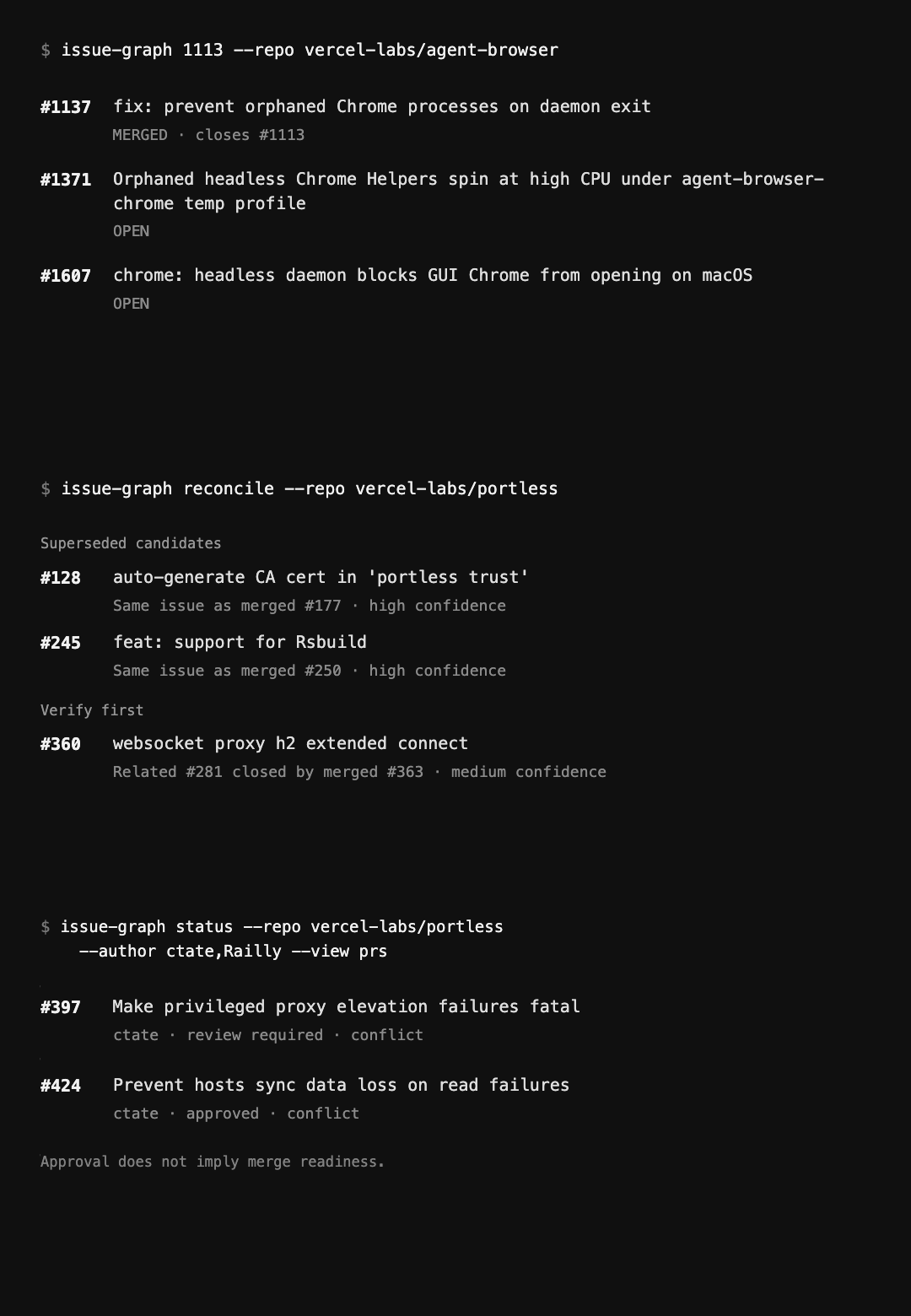
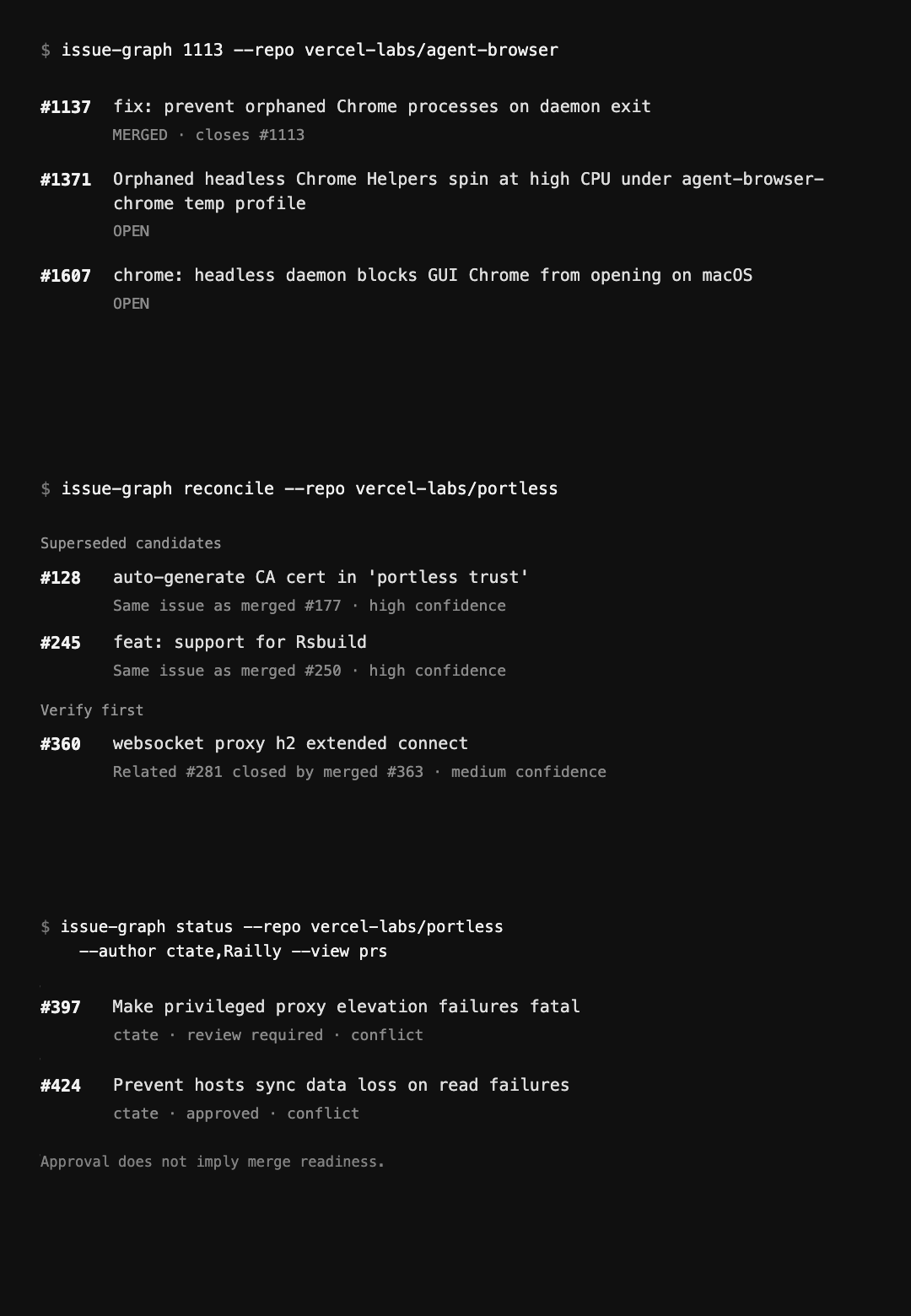
Illustrated workflows: Graph → Reconcile → PR status. Static version · Explore the workflows.
Install the npm package with Node.js 20 or later. GitHub queries use your GitHub CLI login.
Try the CLI without a global installation:
npx issue-graph@latest --helpFor the installed command used below:
npm install --global issue-graph@latest
issue-graph --help
gh auth login
gh auth status
Trace public agent-browser issue #1113 without saving a snapshot:
issue-graph graph vercel-labs/agent-browser#1113 --depth 1 --budget 12 --no-saveTo use npx instead, replace issue-graph with npx issue-graph@latest. At the 2026-09-22 capture, issue #1113 was closed, PR #1137 was merged, regression #1148 was closed, and follow-ups #1371 and #1607 were open. Check the open follow-ups before assuming the fix covers them.
Check missing references and crawl limits in the report. Each run queries GitHub, so results can change. Capture details.
npm install --global issue-graph@latestUse issue-graph --help to check the commands supported by your installed release.
This README follows repository main, which can be ahead of the published package. If a documented command is missing, use a release that includes it or follow the source setup below.
| Need | Installed command |
|---|---|
| Capture a backlog and open its dashboard | issue-graph open owner/repo |
| Inspect an issue or PR before starting work | issue-graph graph vercel-labs/agent-browser#1113 --depth 1 --budget 12 --no-save |
| Survey labeled open issues | issue-graph rank owner/repo --label bug |
| Filter a saved model and open its exact dashboard view | issue-graph query github:owner/repo --state open --view rank --open |
| Count open PRs by author | issue-graph status vercel-labs/portless --author ctate,Railly |
| See PR evidence, assignees, and requested reviewers | issue-graph status vercel-labs/portless --author ctate --view prs |
| Reconcile an open backlog, with or without labels | issue-graph reconcile owner/repo --format json --no-save |
| Select the next backlog action | issue-graph plan owner/repo --format json |
| Inspect the machine contract | issue-graph schema |
Graph and plan default to compact human output in a terminal. Graph still prints Markdown in a pipe; plan prints versioned JSON. Use --format text for the human view outside a terminal, or --format markdown for Markdown. Plan also supports --format json. Human output wraps at up to 100 columns; monochrome bold/dim styling requires a TTY and is disabled by NO_COLOR, CI, or TERM=dumb.
Graph -o PATH.json writes a graph file; its legacy --format json still prints Markdown. Reconcile defaults to terminal Markdown and piped JSON; --format human and text select Markdown. Status defaults to a terminal table or JSON in a pipe; its --json flag takes no filename.
Export a graph and a local Next.js dashboard:
issue-graph graph vercel-labs/agent-browser#1113 --depth 1 --budget 12 --no-save -o graph.json -o graph.htmlOpen graph.html directly in a browser to explore relationships, filter nodes, and review cleanup candidates. Keep the sibling _next/ directory and font-LICENSE.txt when moving the export.
Graph and reconcile runs save local history under ~/.issue-graph/ by default. Re-running the same graph seeds shows a snapshot diff; reconciliation tracks repository-level action changes. --no-save skips saving history but does not prevent explicitly requested -o exports. Plan writes no snapshots.
Status history is opt-in:
issue-graph status vercel-labs/portless --author ctate,Railly --save
issue-graph status vercel-labs/portless --author ctate,Railly --since last --save
Status reports unknown counts as ? or null. Check coverage before using totals, and review CI and unresolved review threads separately before merging.
Save a dashboard model with issue-graph open owner/repo --no-open, then use its filters and scoring from the CLI without another provider request:
issue-graph query github:owner/repo --kind Issue --heat-min 50 --view rank --open
issue-graph query github:owner/repo --cluster 0 --cluster 2 --view swarm --metric heat --json
issue-graph query --history HISTORY_ID --open
Query prints JSON in a pipe. In a terminal it shows a short summary and requests opening the exact view; --no-open suppresses that request. Results include captured items, scores, capabilities, coverage, a capture ID, a history ID and viewUrl. Return viewUrl unchanged, including the query string and hash. The Next.js page embeds the capture and effective weights; its compiled assets are stored beside it, so an old link stays stable when defaults or saved runs change. Replace HISTORY_ID with the returned historyId to replay frozen parameters. --capture queries the same data with current defaults and newly supplied filters, without inheriting earlier filters.
Scopes are provider-qualified: github:owner/repo or linear:workspace:project:project-id. Other providers can supply the same normalized dashboard model through --input model.json; graph JSON from -o graph.json is a different format. This command does not collect live Linear or Jira data. Unsupported provider filters fail explicitly. Cluster indices belong to the selected capture; inspect groups before choosing them. See Dashboard and saved queries for the full workflow.
Set persistent weights explicitly:
issue-graph config set --weights comments=3,age=1
issue-graph config set --provider github --scope owner/repo --weights reactions=4
issue-graph config show --provider github --scope owner/repo
Defaults resolve from built-in values, global defaults, provider defaults, project defaults, then command overrides. Named weights range from 0 to 10. Config lives in ~/.issue-graph/config.json; immutable captures and query receipts live in captures/ and history/. ISSUE_GRAPH_HOME overrides the state directory. Dashboard sliders affect only the current URL/session; Reset weights restores that document's opening weights. Only config set updates persistent defaults. Captures remain on this machine until you remove them.
Install the CLI with npm install --global issue-graph@latest, then install the agent skill separately:
npx skills@latest add vercel-labs/issue-graphChoose your agent and project scope, preserving any local skill changes. If you cannot access the repository, use npx skills@latest add https://issue-graph.dev. The public site, /skill.md, and repository skill serve the same canonical skill. CLI installation and GitHub authentication are separate setup steps.
Before operational commands, load and read the guidance bundled with the installed CLI:
issue-graph skills get core
issue-graph skills get core --full
Use --full for workflow references, issue-graph skills list for available guides, and command-specific --help for syntax. If the CLI or guidance is missing, report the error and ask for an authorized setup correction. See Agents for setup.
Use issue-graph cluster owner/repo to print a root-cause clustering task for the calling agent, then issue-graph cluster owner/repo --apply answer.json (or - for stdin) to load its answer. For cron or CI, --agent claude or --agent codex sends it to an installed headless agent. Review the payload and the agent's permissions and data policy before using private repository evidence; the CLI does not sandbox that process.
Install the published library with npm install issue-graph@latest. It separates the runtime-agnostic core (issue-graph) from shell (issue-graph/transport/shell, using gh) and HTTP (issue-graph/transport/http, using fetch plus a token) transports. See Library for ESM imports and server-side credential handling.
Read the documentation at issue-graph.dev/docs, or browse its source in this checkout:
- Get started: installation, authentication, and a first result
- Graph: depth, caps, snapshots, and HTML
- Dashboard: filters, exact links, replay, and scoring defaults
- Status: counts, coverage, and history
- Backlog: reconcile and plan
- Agents: skill setup and optional clustering
- Library: core, shell, and HTTP integrations
- Security: permissions and private data
- Reference: commands and output contracts
- Changelog: release notes
The CLI reads GitHub data and can save local snapshots or exports. Depth, node caps, hubs, permissions, and per-node API limits affect coverage. Inspect linked code and current behavior before closing an issue or merging a PR.
Snapshots, exports, logs, and cluster prompts can contain private repository metadata. Anyone with an HTML export can read its embedded data. Review content and storage permissions before sharing. See security guidance and vulnerability reporting.
The source repository is public. Use Node.js 20.19.x or 22.12+ (24 recommended) and pnpm. Live queries also need GitHub CLI authentication. Follow Contributing for setup.
To update a clean source checkout:
git pull --ff-only
pnpm install --frozen-lockfile
pnpm build
pnpm link --global
Contributor checks:
pnpm check
pnpm test:package
pnpm build emits the Node CLI and library in dist. Package verification tests a packed local installation, or an existing archive in supplied-tarball mode. See Contributing for the retained-artifact release process. To compare transports against live GitHub data, use pnpm exec tsx scripts/verify-transports.ts <number> <owner/repo> <depth> with appropriate access.
From the repository root, start the docs website on a fixed local port:
pnpm dev:docs --hostname 127.0.0.1 --port 3399Validate the production build separately. The HTTP suite checks production cache behavior, which differs from the development server:
pnpm check:docs
pnpm build:docs
pnpm --filter @issue-graph/docs test:ci
The last command starts and stops its own test server. For a manual browser session or audit, stop the development server and run pnpm --filter @issue-graph/docs start --hostname 127.0.0.1 --port 3399. In another terminal:
DOCS_TEST_URL=http://127.0.0.1:3399 pnpm test:docs:routes
DOCS_TEST_URL=http://127.0.0.1:3399 pnpm audit:docs
The agent-readability audit may follow production canonical URLs from a localhost start URL. Check its destinations when comparing local changes. is-agentic.com requires a publicly reachable URL.
apps/dashboard is the Next.js dashboard used by open, dashboard, cluster --apply, and query. Its React host mounts the original dashboard renderer and CSS, preserving its layout, graphs, and animations. The renderer lives in src/dashboard-view.js; filters, ranking, graph metrics, and URL state share the CLI core. src/html.ts retains the programmatic HTML exporter using the same renderer. apps/docs remains the documentation site.
Run bun run dev:dashboard and choose a normalized capture JSON locally. The browser does not upload it. bun run build includes the static Next.js export in the CLI package; end users do not need to run a Next.js server. bun run test prepares the same dashboard build before testing saved views.
Apache-2.0