Channel是可读切可写的,Stream只可读或可写Channel可异步读写Channel总是从Buffer中读写
Channel 常用的实现类:FileChannel、DatagramChannel(UDP)、SocketChannel(TCP)、ServerSocketChannel(TCP)
transferFrom():transferFrom(ReadableByteChannel src, long position, long count)transferTo():transferTo(long position, long count, WritableByteChannel target)
- 将数据写入
Buffer - 调用
flip()方法,从写模式切换到读模式 - 从
Buffer中读数据 - 调用
clear()或compact方法,清空Buffer
- capacity:
Buffer分配内存大小 - position:
- 写模式:初始为 0,随着数据被写入
Buffer会指向下一个将要写入数据的位置 - 读模式:当从写模式切换到读模式,指向 0 位置,随着数据从
Buffer中读取会指向下一个将要读取数据的位置
- 写模式:初始为 0,随着数据被写入
- limit:
- 写模式:可以将多少数据写入
Buffer,写模式下等于 capacity - 读模式:当从写模式切换到读模式,表示
Buffer中还有多少数据可以读取,因此读模式下等于 position
- 写模式:可以将多少数据写入
关系:position <= limit <= capacity
向 Buffer 中写数据:
- 从
Channel向Buffer中写数据,例如:int bytesRead = inChannel.read(buf); - 自定义向
Buffer中写数据,例如:buf.put(127);
从 Buffer 中读数据:
- 将
Buffer中的数据写入Channel,例如:int bytesWritten = inChannel.write(buf); - 通过
get()方法获取,例如:byte aByte = buf.get();
flip():从写模式切换到读模式
    public final Buffer flip() {
        limit = position;
        position = 0;
        mark = -1;
        return this;
    }
rewind():重置 position 属性为 0,可以重新读取 Buffer 中的内容
    public final Buffer rewind() {
        position = 0;
        mark = -1;
        return this;
    }
clear():清空 Buffer 数据,可用于后续数据读入,此时 piositoin = 0,limit = capacity,PS:数据并非真正的被清空,只是重置一些属性用于表明 Buffer 可再次写入数据
    public final Buffer clear() {
        position = 0;
        limit = capacity;
        mark = -1;
        return this;
    }
compact():将 Buffer 中未读的数据复制到 Buffer 头,此时 position = capacity - position,limit = capacity
HeapByteBuffer 代码如下:
    public ByteBuffer compact() {

        System.arraycopy(hb, ix(position()), hb, ix(0), remaining());
        position(remaining());
        limit(capacity());
        discardMark();
        return this;
    }

    public final int remaining() {
        return limit - position;
    }
mark() & reset():通过 mark() 进行标记,调用 reset() 方法时回到标记位置
    public final Buffer mark() {
        mark = position;
        return this;
    }

    public final Buffer reset() {
        int m = mark;
        if (m < 0)
            throw new InvalidMarkException();
        position = m;
        return this;
    }
Scatter & Gather samples
    // Scatter:多个 Buffer 读取一个 Channel
    ByteBuffer header = ByteBuffer.allocate(128);
    ByteBuffer body   = ByteBuffer.allocate(1024);
    ByteBuffer[] bufferArray = { header, body };
    channel.read(bufferArray);

    // Gather:将多个 Buffer 中的数据写入一个 Channel
    ByteBuffer header = ByteBuffer.allocate(128);
    ByteBuffer body   = ByteBuffer.allocate(1024);
    Byt);eBuffer[] bufferArray = { header, body };
channel.write(bufferArray使用 Selector 只需要一个线程就可以处理多个 Channel,PS:如果 CPU 是多核的,在没有多任务同时执行的情况下,甚至会浪费 CPU 内核资源
在使用 Selector 时 Channel 必须是非阻塞的,这意味着 FileChannel 不支持 Selector,因为它是阻塞的,Socket Channel 可以很好的支持
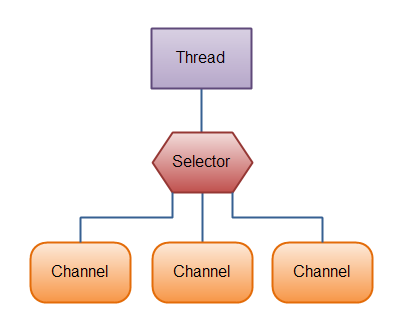
图片来源:Java NIO Selector
可以通过如下方式创建一个 Selector 并注册 Channel:
    Selector selector = Selector.open();

    channel.configureBlocking(false);
SelectionKey key = channel.register(selector, SelectionKey.OP_READ);- Connect:
SelectionKey.OP_CONNECT - Accept:
SelectionKey.OP_ACCEPT - Read:
SelectionKey.OP_READ - Write:
SelectionKey.OP_WRITE
事件类型可以进行组合,samples:int interestSet = SelectionKey.OP_READ | SelectionKey.OP_WRITE;
    // 感兴趣的事件集合
    int interestSet = selectionKey.interestOps();'

    // 就绪的 channel 集合
    int readySet = selectionKey.readyOps();

    // 获取对应的 Channel 与 Selector
    Channel  channel  = selectionKey.channel();
    Selector selector = selectionKey.selector();

    // 将对象存储在 selectionKey 中
    selectionKey.attach(theObject);
    Object attachedObj = selectionKey.attachment();
SelectionKey key = channel.register(selector, SelectionKey.OP_READ, theObject);select 方法:返回就绪的 Channel 的数量
- select():在至少一个
Channel就绪之前一直阻塞 - int select(long timeout):在指定的时间内阻塞,为 0 时表示一直阻塞
- int selectNow():不阻塞,直接返回
如果某个通道在上一次调用 select 方法时就已经处于就绪状态,但并未将该通道对应的 SelectionKey 对象从 selectedKeys 集合中移除,假设另一个的通道在本次调用 select 期间处于就绪状态,此时,select 返回 1,而不是 2
selector.selectedKeys(); 方法用于返回就绪的 Channel 对应的 SelectionKey 集合,当你处理完就绪 Channel 后一定要将对应的 SelectionKey 从 selectedKeys 集合中删除
NIO 与 传统 IO 如何选择
- 如果你需要管理成千上万个连接,切这些连接每次只发送少量的数据,比如:聊天服务器,这时可以选择 NIO
- 如果你只需要管理少量的连接,切每个连接都占用比较大的带宽、发送大量的数据,可以选择传统 IO
from:Java NIO